

Instagram Behavioral Targeting: 5 Tips to Boost Your Ad ROI
Welcome back to Surfside PPC. Today, we're going to be going over Instagram behavioral targeting. Most advertisers just rely on basic demographics like age and gender, but truthfully, if you want to see a real return on your ad spend, behavioral targeting is where you really need to focus.
Basically, behavioral targeting looks at actual user actions—like saving your posts, watching your Reels, or clicking "Shop Now." These behaviors signal a much stronger purchase intent and will significantly improve your overall ad performance. Instagram and Meta offer incredible tools like Custom Audiences and Detailed Targeting to let you leverage these exact actions.
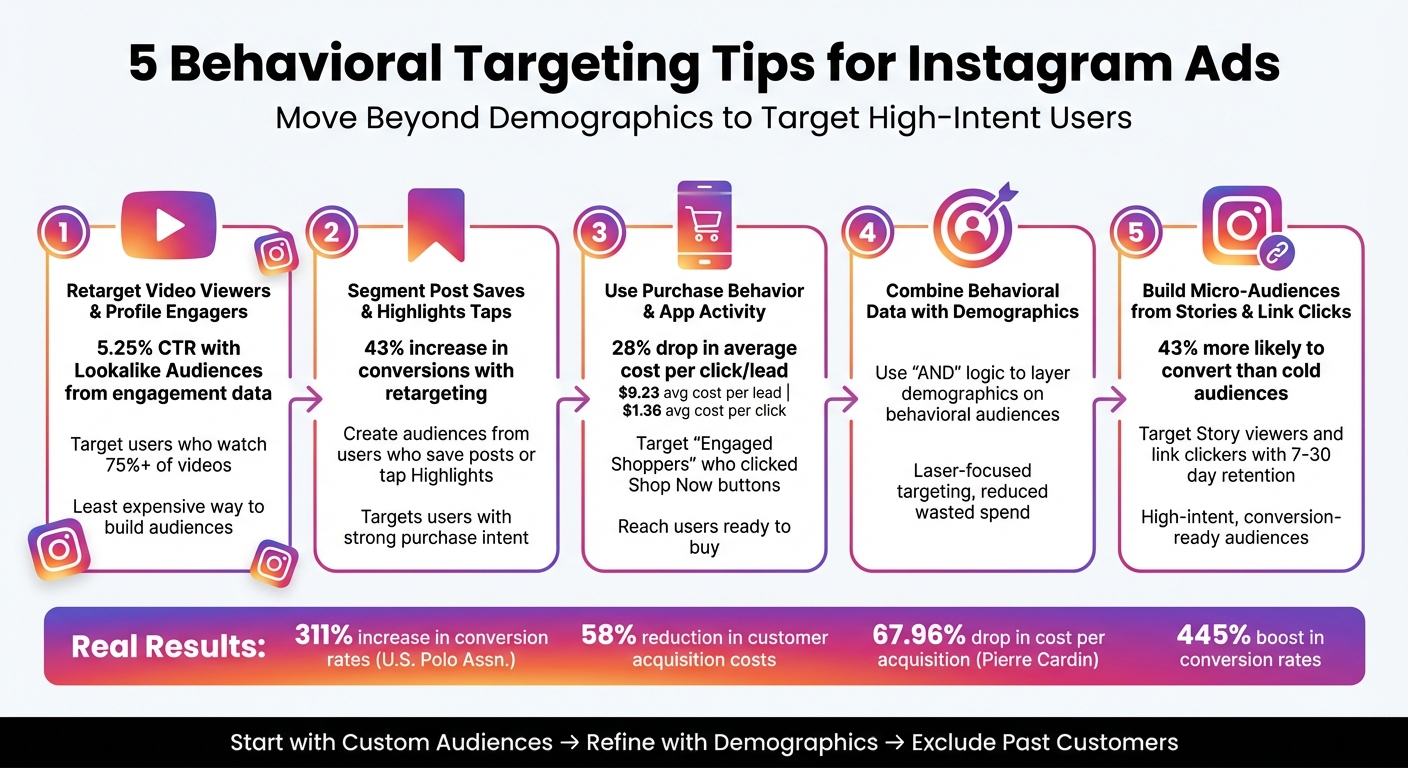
So, here are 5 actionable tips I use to boost conversions with behavioral targeting on Instagram:
- Retarget Video Viewers and Profile Engagers: Focus your budget on users who actually interact with your content (e.g., people who watch 75% of a video) for highly cost-effective campaigns.
- Segment Post Saves and Highlights Taps: Target users who save your posts or tap your Highlights. Saving a post shows massive buyer intent.
- Use Purchase Behavior and App Activity: Leverage the "Engaged Shoppers" behavior and your app activity data to find users who are ready to pull out their credit cards.
- Combine Behavioral Data with Demographics: Narrow your audience by integrating these behavioral signals with your ideal customer's exact age, gender, or location.
- Build Micro-Audiences from Stories and Link Clicks: Create small, high-intent retargeting groups based specifically on recent Story engagement or link clicks.
Behavioral targeting drastically improves your ROI by reaching people who are already interested in your brand. I always start by creating Custom Audiences, refining them with my core demographics, and explicitly excluding my past customers so I don't waste money on people who have already purchased.
5 Behavioral Targeting Tips for Instagram Ads
1. Retarget Video Viewers and Instagram Profile Engagers
Why Behavioral Signals Improve Your Meta Ads Targeting
Video viewers and profile engagers are what we call warm audiences. These are people who have already shown a measurable interest in your brand. Think about it: if someone sits there and watches 75% of your Instagram Reel or spends a few minutes exploring your profile, they have a level of intent that goes way beyond what basic demographic targeting can ever find. These behavioral signals allow you to group users based on exactly how much they’ve interacted with your content.
Someone who scrolls past your video after 3 seconds isn’t the same as someone who sticks around for 95% of it. To make the most of this, I highly recommend creating separate custom audiences for different levels of engagement. You can then use your absolute best audiences (like people who send you DMs or save posts) as a "seed" to create Lookalike Audiences. This lets the Meta algorithm go out and find brand new users who behave exactly like your best customers.
Impact on Ad Engagement and Conversions
The data absolutely backs this up. Lookalike Audiences built from 365 days of high-quality Instagram engagement data consistently pull much higher Click-Through Rates (CTRs) than broad, interest-based targeting.
Another huge perk? Retargeting your video viewers is one of the cheapest ways to build a funnel on Meta platforms. Since these users already recognize your brand, your cost-per-click (CPC) and cost-per-acquisition (CPA) drop significantly, making your ad budget stretch much further.
Setup Process Using Meta Ads Tools
To set this up, go to the Audiences tab inside your Meta Ads Manager and click Create Custom Audience. Choose Video or Instagram Account as your source. If you choose video, you can segment viewers by watch time—I usually test 50%, 75%, and 95% completion rates. Set your retention window (up to 365 days). Once it's built, just select this Custom Audience at the Ad Set level of your new campaign.
sbb-itb-d8a1e45
2. Segment Custom Audiences Based on Post Saves and Highlights
Why Post Saves Indicate Massive Buyer Intent
When someone takes the time to save your post or tap through your Highlights, they are literally bookmarking your content for later. That is a massive sign of intent. By leveraging these specific actions to create Custom Audiences, you can pinpoint extremely warm leads.
Michelle Morgan, Co-Founder of Paid Media Pros, says it perfectly:
"With Instagram, you can create audiences of users who have engaged with your profile, seen certain posts as ads, and various engagement signals. These custom audiences help you create lists of users to re-engage with."
Impact on Ad Engagement and Conversions
Focusing your budget on users who save posts will drastically enhance your conversion rates. Retargeting these individuals means you are reaching people who have already moved beyond the "awareness" stage and are actively considering your product. This strategy ensures you aren't wasting money on cold traffic.
Setup Process Using Meta Ads Tools
Setting this up is super easy. Head back to the Audiences section, click "Create Audience", then "Custom Audience." Select "Instagram Account" as your source. From the dropdown, select "People who saved any post or ad."
Your retention window here can range from 30 to 365 days. I usually prefer shorter windows (like 30 or 60 days) for e-commerce retargeting because the intent is freshest. And please, always use the "Exclude" function to filter out your past purchasers so you don't annoy people who already bought the item.
3. Use Purchase Behavior and App Activity Signals
Targeting "Engaged Shoppers" on Instagram
Purchase behavior targeting is one of my favorite features in Meta Ads Manager. Meta has a specific detailed targeting option called "Engaged Shoppers." This targets users who have clicked a "Shop Now" button anywhere on Facebook or Instagram in the past week. It virtually guarantees your ads are being shown to people who actively buy things online.
Impact on Ad Engagement and Conversions
Using Meta's audience tools to harness these purchase behaviors delivers tangible results. Advertisers frequently see a drop in their average cost per lead and cost per landing page view when they restrict their targeting to proven buyers.
Setup Process Using Meta Ads Tools
To use this, start in your Ad Set settings. Go to the "Detailed Targeting" section and click "Browse." Navigate to Behaviors > Purchase Behavior, and check the box for "Engaged Shoppers."
If you have an app, you can go to the "Audiences" tab, create a Custom Audience, and select "App Activity" to target users who added items to their cart but abandoned it. Again, upload a CSV of your actual customers and exclude them from your prospecting campaigns to keep your data perfectly clean.
4. Combine Interaction Audiences with Core Demographics
Layering Demographics Over Behavioral Data
Behavioral signals tell you what someone is interested in, but demographics ensure they actually fit your customer profile. For example, if you sell high-end women's fashion in the US, someone in Europe who watched your video isn't going to buy your product. You need to combine the behavioral intent (watched 75% of a video) with the demographic reality (Women, 25-54, living in the US).
Using the "Narrow Audience" (AND) logic ensures you’re only paying for clicks from people who meet both criteria. This is how you achieve laser-focused targeting and stop wasting your daily budget.
Setup Process Using Meta Ads Tools
- Select Your Custom Audience: At the Ad Set level, choose the engagement audience you built earlier (e.g., Video Viewers).
- Define Demographic Parameters: Scroll down and set your strict Age, Gender, and Location requirements.
- Apply "Narrow Further" Logic: If you want to get even more specific, use Detailed Targeting to say they must ALSO be interested in a specific brand or topic.
5. Build Micro-Audiences from Instagram Story and Link Clicks
Capturing High-Intent Story Viewers
When users engage with your Instagram Stories or click the link in your bio, they are showing immediate, clear intent. These moments are golden opportunities to drop these users into a highly specific retargeting funnel.
Impact on Ad Engagement and Conversions
Retargeting website visitors based on their link clicks makes them up to 43% more likely to convert than cold audiences. If someone clicked a "Swipe Up" or link sticker in your Story within the last 7 days, they are absolutely primed for a conversion-focused ad offering a discount or free shipping.
Setup Process Using Meta Ads Tools
Head to Meta Ads Manager > Audiences > Create Custom Audience. For Story engagement, choose Instagram Account as your source, and select "Everyone who engaged with this professional account." Set a very tight retention period—like 7 to 14 days—because Story engagement loses its warmth very quickly.
Conclusion
Basically, behavioral targeting has completely reshaped how we run Instagram ads. You cannot just rely on broad interests anymore. You have to target users based on their actual actions: watching your videos, saving your posts, tapping your Stories, and clicking your links. This guarantees you are putting your budget behind the people most likely to buy.
Ready to get started? Go into your Ads Manager today and build a Custom Audience of everyone who has engaged with your Instagram profile in the last 90 days. Exclude your past purchasers, layer on your target demographics, and run an ad to them. You will see your CPA drop almost immediately.
If you need help implementing any of these strategies, Surfside PPC offers expert Meta Ads management services. We can help you build these audiences, optimize your campaigns, and boost your overall ROI.
FAQs
How can I retarget people who interact with my Instagram Stories?
If you want to reconnect with users who have interacted with your Instagram Stories, you really need to set up an Instagram Custom Audience in the Meta Ads Manager. Start by selecting "Instagram Account" as your data source. From the dropdown, choose the criteria that best fits your goal, like people who engaged with your account. Then, set a tight retention window—like 14 or 30 days—so you are only targeting people with fresh intent.
Once the audience populates, create a new conversion campaign and select this audience at the Ad Set level. I highly recommend showing them a specific offer or product demonstration to push them over the edge. If you’re looking for a hassle-free option, Surfside PPC can actually set up and manage these Instagram retargeting funnels for you to ensure you get the absolute best ROI possible.
How does combining behavioral data with demographic targeting improve Instagram ad performance?
Combining behavioral data with demographic targeting is exactly how you stop wasting your ad spend on unqualified clicks. Behavioral data (like watching a video) tells you someone is interested, but demographic data (like age and location) ensures they are actually capable of buying your product or service.
By forcing the Meta algorithm to find users who meet both criteria, you ensure your ads land in front of the perfect customer at the perfect moment. This strategy drastically increases your ad relevance score, drives much higher click-through rates, and ultimately lowers your cost-per-acquisition.
How can I create a Custom Audience using Instagram engagement data?
To build a Custom Audience using Instagram engagement, you first have to make sure your Instagram business profile is linked to your Facebook Page and Meta Business Suite. Once that is done, go to Ads Manager > Audiences, click Create Audience > Custom Audience, and select Instagram Account as your source.
From there, you choose exactly what type of engagement you want to target—like profile visits, post saves, or ad interactions. Set your retention window (up to 365 days, though I always prefer 30-90 days for warmer leads) and name your audience something clear, like "IG Engagers - Last 90 Days". Save it, and you can instantly plug it into your next campaign. If you need professional help optimizing this setup, Surfside PPC provides specialized ad management to get your campaigns running smoothly.
0 comments