

Understanding how much your competitors spend on ads can help you make smarter decisions about your own campaigns. While exact numbers are hard to find, there are five effective methods to estimate their budgets:
- Google Ads Auction Insights: Analyze metrics like Impression Share to gauge competitor bidding strategies.
- Google Ads Keyword Planner: Use CPC and search volume data to estimate spending.
- SpyFu: View estimated budgets, keywords, and historical trends for competitors.
- SEMrush Advertising Research: Access Traffic Cost metrics to evaluate ad spend and strategies.
- Free Tools: Use Google Ads Transparency Center, ad libraries, and manual searches for visibility trends.
Each method has its strengths and limitations, but combining them gives you a clearer picture of your competitors' ad strategies. Focus on trends, seasonal shifts, and relative comparisons to refine your approach.
Quick Comparison
| Method | Cost | Key Insights Provided | Limitations |
|---|---|---|---|
| Google Ads Auction Insights | Free (with account) | Impression Share, competitor activity | Limited to auctions you participate in |
| Google Ads Keyword Planner | Free (with account) | CPC, search volume, bid ranges | Broad estimates, lacks total spend visibility |
| SpyFu | $33–$299/month | Estimated spend, keywords, historical trends | Estimates can vary in accuracy |
| SEMrush Advertising Research | $139.95+/month | Traffic Cost, keywords, ad creatives | Expensive, focuses on patterns not exact data |
| Free Tools | Free | Ad visibility, creative formats, trends | Limited accuracy, requires manual effort |
Use these tools together to identify opportunities and refine your campaigns without overspending.
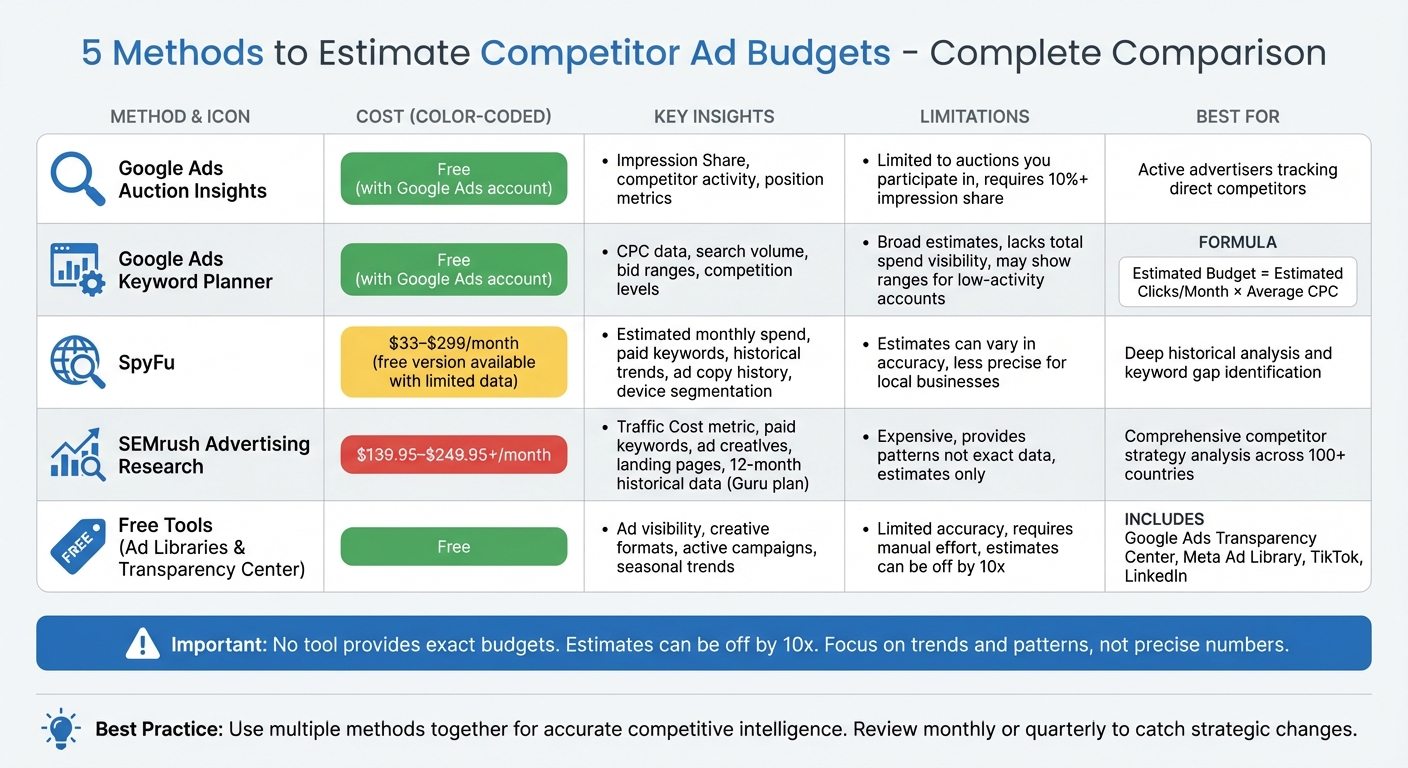
Comparison of 5 Methods to Estimate Competitor Ad Budgets
How To See ALL of Your Competitor's Ads & Ad Spend in 2025!
sbb-itb-d8a1e45
1. Use Google Ads Auction Insights
Google Ads Auction Insights is a powerful, built-in tool that helps you gauge how your ads stack up against competitors in shared auctions. While it won’t reveal exact dollar amounts, it provides visibility into key metrics that can help you estimate competitors’ budgets. One of the most important metrics is Impression Share (IS) - this shows the percentage of impressions a competitor received out of the total available in the auctions they qualified for. For instance, if your competitor has a 60% impression share while you’re sitting at 20%, it likely signals a higher budget or more aggressive bidding strategies on their part.
Let’s dive into how you can easily access and interpret this data.
Ease of Access to Data
Auction Insights is conveniently located in the "Insights and reports" section of your Google Ads dashboard. You can pull this report at multiple levels - account, campaign, ad group, or even keyword - allowing you to focus on specific high-value terms or take a broader view for strategic planning. Keep in mind, though, that these insights are only available if your search impression share exceeds 10%.
For Search campaigns, you’ll typically get six metrics: impression share, overlap rate, outranking share, position above rate, top of page rate, and absolute top of page rate. On the other hand, Shopping campaigns provide three metrics: impression share, overlap rate, and outranking share. This flexibility makes it a valuable tool for pinpointing areas where your ads might need a boost.
Depth of Competitor Insights Provided
The Auction Insights report doesn’t just show you numbers - it identifies "auction competitors", or domains actively bidding for the same ad space as you. Metrics like Position Above Rate and Absolute Top of Page Rate can give you a sense of how aggressively competitors are bidding. For example, a high Absolute Top of Page Rate suggests a competitor is willing to pay premium prices to secure the top spot.
Brad from Adalysis explains this dynamic well:
"You're only showing 16% of the time, they're showing 30%, meaning they probably have a higher budget than us."
By tracking these metrics over time, you can spot trends, such as competitors running out of budget toward the end of the month.
Accuracy of Budget Estimation
While Auction Insights provides a helpful snapshot of competitor activity, it’s important to note its limitations. The data reflects only the auctions you participated in, so it doesn’t account for your competitors’ entire keyword strategy or total ad spend. Additionally, Google doesn’t share details like specific keywords, bids, or ad creatives. A high impression share could also result from a better Quality Score, not just a bigger budget.
To better understand your competitive standing, review the "Search Lost IS (Budget)" and "Search Lost IS (Rank)" columns in your campaign overview. These metrics can help you determine whether budget constraints or ad rank issues are causing you to miss out on valuable impressions.
While Auction Insights offers useful clues about your competitors, it’s just one piece of the puzzle when it comes to understanding your market position.
2. Use Google Ads Keyword Planner
Google Ads Keyword Planner is a handy tool for gathering data like cost-per-click (CPC) and search volume, which can help you estimate competitor ad spend. While it won't give you exact numbers, it provides enough information to make informed guesses about their budgets.
Cost of Using the Tool
The Keyword Planner is free to use if you have a Google Ads account. Even if you're not actively running campaigns or have a smaller budget, you can still access its basic features. However, Google might display broad search volume ranges (like 10,000–100,000 searches) instead of precise figures if your account activity is limited.
Ease of Access to Data
You can find Keyword Planner in the "Tools and Settings" menu of your Google Ads account. To analyze competitor data, use the "Start with a website" option. Enter a competitor's URL, and the tool will generate related keywords along with bid insights. You'll see metrics like the "Top of page bid" (both high and low ranges), which reflect what advertisers typically pay for premium ad placements.
Depth of Competitor Insights Provided
Keyword Planner goes beyond basic data by categorizing keyword competition levels - low, medium, or high - making it easier to estimate how much money you'll need to outrank competitors for specific terms. It also provides estimates for average monthly searches and suggested bid amounts, giving you a clearer picture of the financial landscape.
To estimate a competitor's budget, you can use this simple formula:
Estimated Budget = Estimated Clicks per Month × Average CPC
For instance, if a keyword averages a CPC of $3.50 and gets 2,000 clicks monthly, the estimated spend would be around $7,000.
Accuracy of Budget Estimation
While these estimates are helpful, they’re not exact. As Pankaj Yadav, an IT professional and SEO expert, explains:
"No tool provides exact competitor budgets... they provide a useful approximation but may not reflect the precise spending of your competitors."
It's also worth noting that the "Top of page bid" ranges might underestimate the actual cost of securing top placements. Additionally, Keyword Planner doesn’t show a competitor's total click volume or overall spend. To refine your estimates, consider cross-referencing CPC data with traffic insights from other tools.
3. Analyze with SpyFu
SpyFu, like Auction Insights and Keyword Planner, helps sharpen your understanding of competitor spending. It provides detailed insights into how competitors allocate their Google Ads budgets, revealing every keyword they bid on and estimating their monthly ad spend.
Cost of Using the Tool
SpyFu has a free version that offers basic insights, such as the top five paid keywords for any domain. For more comprehensive data, paid plans start at $33 per month and go up to $299, depending on the level of access you need.
Ease of Access to Data
Using SpyFu is straightforward. Simply enter a competitor's domain, and you'll instantly see their estimated monthly ad budget, paid keywords, and traffic breakdown. The tool also provides historical ad data, allowing you to track how competitors have adjusted their ad copy over time. Features like the "Keyword Universe" let you uncover every domain bidding on specific Google Ads. Additionally, SpyFu segments data by device, offering insights into mobile and desktop targeting. This quick access makes benchmarking competitor strategies much more efficient.
Depth of Competitor Insights Provided
SpyFu digs deeper than just budget estimates, offering a window into the strategies behind competitor spending. For instance, in the vacuum cleaner industry, SpyFu has highlighted significant differences in how brands allocate their budgets. It identifies keyword gaps and tracks terms competitors consistently bid on, which can signal strong ROI. You can also filter out branded keywords to focus on broader market trends. Beyond that, SpyFu allows you to analyze conversion funnels by examining landing page designs and calls-to-action.
Accuracy of Budget Estimation
SpyFu calculates ad spend estimates using this formula: Total Monthly Clicks × Percentage of Paid Clicks × Phrase Cost Per Click. While helpful, these figures are approximations since Google doesn’t share actual budget data. The estimates tend to be more accurate for national or broad-market advertisers. However, for industries that rely heavily on local targeting - like plumbing or construction - the data can be less precise. Because of this, it’s better to focus on trends and relative values over time rather than taking the specific amounts at face value. SpyFu adds a valuable dimension to your competitive analysis, complementing the other tools discussed earlier.
4. Use SEMrush Advertising Research
SEMrush Advertising Research offers a way to estimate competitor ad spend on Google Search by using a metric called Traffic Cost. This metric combines CPC (cost-per-click) and ad position data to provide an overview of ad spending. It complements tools like Auction Insights and Keyword Planner by adding another layer of insight into competitor strategies.
Cost of Using the Tool
SEMrush pricing starts at $139.95 per month, with higher-tier plans offering more advanced features. For example, the Pro plan includes access to the current month's advertising data. If you need a deeper dive, the Guru plan, priced at $249.95 per month, provides up to 12 months of historical data and additional cross-channel insights.
Ease of Access to Data
Using SEMrush is straightforward. Just type in a competitor's domain to unlock a wealth of information, including traffic cost, paid keywords, ad copies, and landing page prominence. You can also explore geographic insights across more than 100 countries. The Ads History tab is particularly useful - it shows how long specific ads have been running, offering clues about which campaigns have been successful over time.
Depth of Competitor Insights Provided
SEMrush goes beyond basic budget estimates by delivering a detailed breakdown of your competitors' strategies. You can see the keywords they bid on, along with search volumes and competitive density. The tool also lets you analyze their ad creative - headlines, descriptions, and calls-to-action - as well as the landing pages they’re driving traffic to. For example, you can uncover seasonal trends in their ad spending, helping you fine-tune your own budget and strategy.
Accuracy of Budget Estimation
It’s important to note that SEMrush provides estimates, not exact numbers, since platforms don’t disclose precise spending data. According to SEMrush experts, these figures are best used to identify patterns and trends rather than exact amounts. For maximum value, focus on relative comparisons, month-to-month changes, and seasonal shifts in spending behavior. These insights can guide smarter decision-making and budgeting.
5. Check Traffic Volume and Impression Share with Free Tools
If you're looking to understand competitor ad visibility and impression share without spending a dime, free tools can provide valuable insights. One of the most reliable options is Google Ads Auction Insights, which draws data directly from the ad auctions you're already part of. This complements earlier methods by focusing on free resources that help uncover competitor trends and activity.
Cost of Using the Tool
The best part? These tools are free to use. While Google Ads Auction Insights requires an active Google Ads account, there’s no extra cost to access the data. Similarly, the Google Ads Transparency Center is open to everyone, allowing you to view active ads without needing an account. Other platforms, like Meta, TikTok, and LinkedIn, also offer free ad libraries for browsing competitor campaigns.
Ease of Access to Data
Getting the data is a breeze. For Auction Insights, simply log into your Google Ads account, go to "Campaigns" or "Keywords", and select "Auction Insights" to see competitor bidding data. The Transparency Center allows you to search a competitor's domain and view all their active ads across Search, YouTube, and Display. Social media ad libraries work similarly, giving you a window into competitors' display ads and campaign strategies. You can also take a hands-on approach by performing incognito keyword searches at different times to observe competitor activity during peak and off-peak hours.
Depth of Competitor Insights Provided
Auction Insights can help you spot seasonal trends and identify strategic gaps. Meanwhile, the Transparency Center reveals the types of ads competitors are running, whether they’re using video, image, or text formats. A mix of these formats often hints at a larger, more sophisticated budget. To estimate spending, you can combine CPC data from the Keyword Planner with estimated daily clicks to calculate approximate costs manually.
Accuracy of Budget Estimation
Free tools are great for spotting trends, but they’re not designed to deliver exact spending figures. Third-party tools that claim to provide precise monthly ad spend are often far off the mark. According to Austin LeClear from Grow My Ads, these estimates can be off by a factor of 10 - reporting $8,500 when the actual spend is closer to $85,000. While free tools won’t give you exact numbers, they’re reliable for tracking impression share, ad creatives, and month-over-month trends. By focusing on relative changes rather than hard dollar figures, you can still get a solid understanding of competitor activity.
"Don't take the estimated monthly ad spend numbers that tools like Spyfu show to heart. These numbers are almost always wrong. At Grow My Ads, we've seen estimates for our clients that are 10x lower than what they actually spend." - Austin LeClear, Grow My Ads
Conclusion
Pinning down exact competitor ad spend is tricky - Google doesn’t make this information public, and third-party tools can sometimes miscalculate costs by as much as 10 times. That’s why it’s smart to use all five methods together. This combined approach helps you estimate impressions, baseline costs, keyword strategies, and historical trends. To refine your findings, leverage free resources like ad libraries and the Transparency Center.
The real value here lies in spotting patterns and trends, not obsessing over exact numbers. Keep an eye on shifts in impression share and seasonal fluctuations - bid prices can jump by as much as 140% during the holidays.
To stay ahead, make competitor analysis a regular habit. A monthly or quarterly review can help you catch strategic changes before they impact your market share. As Rémi Kerhoas, Paid Media & Data Director, aptly notes:
"Benchmarking PPC competitors involves comparing macro observable trends... not spending time pulling hairs over CPCs"
Use this analysis to pinpoint areas where competitors might be underinvesting or missing valuable keywords.
The ultimate goal isn’t to copy your competitors but to uncover opportunities they’ve overlooked. By applying these five techniques, you’ll be able to set benchmarks, fine-tune bids, and allocate your budget effectively to maintain a competitive edge.
FAQs
How can I use Google Ads Auction Insights to estimate a competitor's ad budget?
The Google Ads Auction Insights report offers key metrics such as impression share, overlap rate, and position above rate. These numbers can reveal a lot about your competition. For example, a high impression share and consistent top-of-page rankings often hint that a competitor is allocating a larger daily or monthly ad budget. In contrast, a low impression share might point to more modest spending.
Digging into these metrics provides a clearer idea of how much your competitors might be pouring into their campaigns. If you're unsure how to interpret this data or want to improve your ad performance, Surfside PPC can assist in breaking down these insights and fine-tuning your strategies.
What are the drawbacks of using free tools to estimate competitor ad budgets?
Free tools can give you a glimpse into your competitors' ad strategies, but they come with some big limitations. For instance, platforms like Google Ads Auction Insights might provide metrics like impression share or overlap rate, but they stop short of revealing critical details like exact ad spend or cost-per-click (CPC) figures. Any budget estimates you pull from these tools are indirect and often lack accuracy.
Another drawback is that free tools usually depend on publicly available data. This information can be outdated, incomplete, or skewed by seasonal fluctuations. Think of these estimates as a rough starting point, not a reliable picture of your competitor’s ad budget. If you’re after accurate and detailed insights, you’ll likely need to turn to paid tools or consult with experts.
How reliable are tools like SpyFu and SEMrush for estimating competitor ad budgets?
Tools like SpyFu and SEMrush are great for getting a general sense of what competitors might be spending on ads. However, it's important to know these numbers are estimates, not exact figures. These tools use algorithms and publicly available data to make educated guesses, so they’re best at spotting trends and providing rough benchmarks - not precise spending details.
That said, they can still be incredibly useful for understanding your competitors' advertising strategies. Just remember to treat these estimates as a launching pad rather than hard facts. Pairing this data with your own market research will give you a more accurate and well-rounded view of your competitive environment.