

Google Ads data isn't just for ads - it can supercharge your inbound marketing strategy. Here's how:
- Understand Your Audience: Use demographics, search terms, and conversion data to learn what motivates your audience.
- Improve Content and Campaigns: Align your content, landing pages, and email campaigns with high-performing keywords and audience insights.
- Track Conversions Effectively: Set up Google Ads and Google Analytics integrations to monitor user actions and optimize campaigns.
- Refine Personas: Analyze age, location, and income data to create precise audience segments.
- Optimize the Funnel: Map conversions to each funnel stage - top (e.g., newsletter sign-ups), middle (e.g., demo requests), and bottom (e.g., purchases) - to identify drop-offs and improve results.
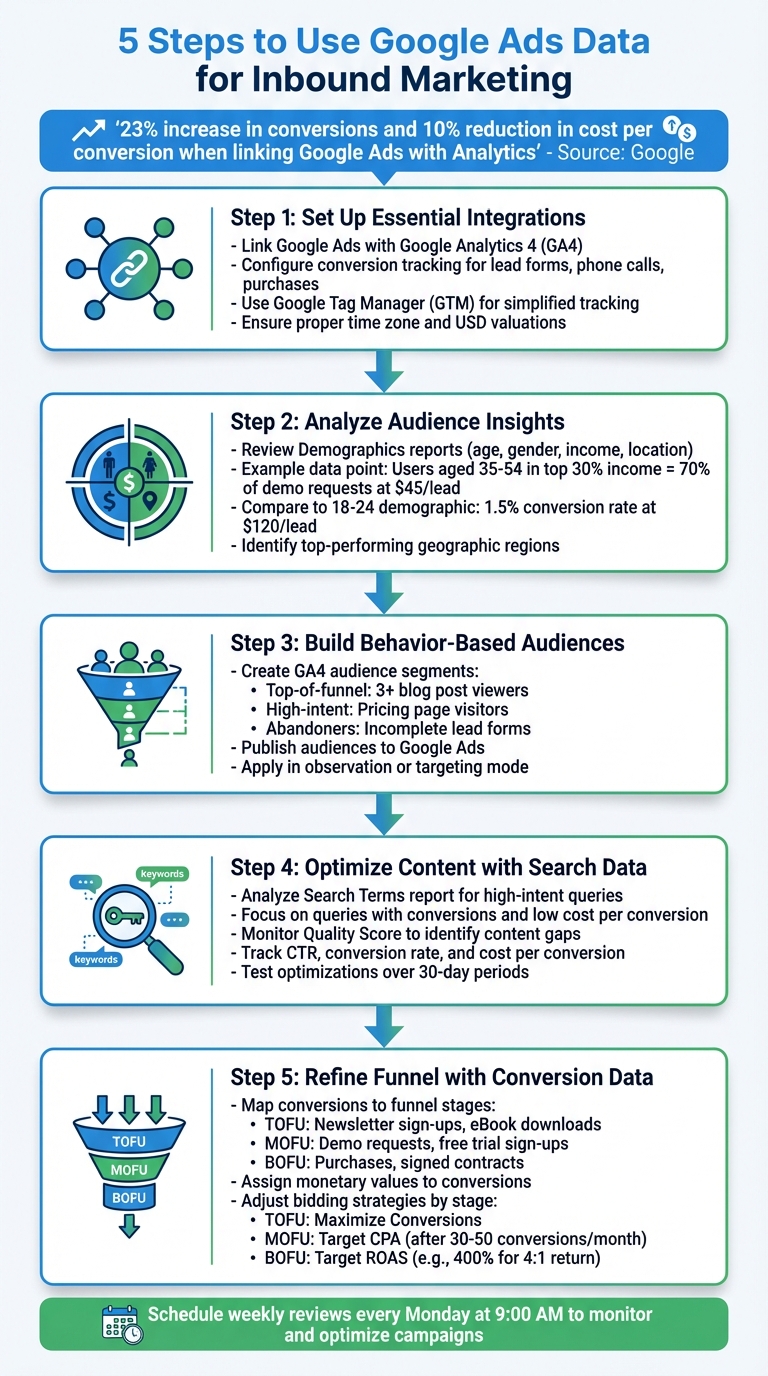
5-Step Process to Use Google Ads Data for Inbound Marketing
Inbound Vs Outbound Advertising | Full Google Ads Tutorial | VIDEO 13
Setting Up Essential Integrations
To truly tap into the power of Google Ads for improving your inbound marketing, you need to ensure the right systems are connected. Three key steps are linking Google Ads with Google Analytics, setting up conversion tracking, and ensuring smooth data flow between platforms. Without these integrations, you'll only see basic metrics like clicks and costs, missing out on crucial insights into user actions that drive inbound success.
Link Google Ads and Google Analytics

The first step is linking your Google Ads account to Google Analytics 4 (GA4). Head to Admin → Product Links → Google Ads Links in GA4, click Link, select your Google Ads account, and confirm the connection. Make sure to enable data sharing and turn on auto-tagging to ensure metrics like clicks, costs, sessions, and conversions transfer seamlessly between the two platforms.
Once the connection is established, you'll be able to view ad performance alongside inbound metrics such as engaged sessions, lead form submissions, and e-commerce transactions in GA4's Acquisition reports. This consolidated view helps you identify which campaigns and keywords are not just driving traffic, but also delivering high-quality leads. These insights can guide you in fine-tuning your content strategy and follow-up efforts.
Configure Google Ads Conversion Tracking
Next, set up conversion tracking in Google Ads for all key inbound goals, such as lead form submissions, phone calls, purchases, and content downloads. Navigate to Tools & Settings > Conversions > New conversion action, and select the source - Website for forms and downloads, Phone calls for tracking calls, or Import if you're pulling data from GA4 or a CRM. Assign a monetary value to each conversion, such as $200.00 for a demo request or $20.00 for an eBook download, to measure the impact of your campaigns effectively.
For phone calls, enable call reporting and set up conversions for both ad-driven and website-driven calls using Google forwarding numbers. Ensure your account's time zone (e.g., America/New_York) matches your operations to maintain accurate reporting. Use Google Tag Manager (GTM) for tracking whenever possible - it simplifies tag management, minimizes the need for developer support, and allows you to set up detailed triggers for events like PDF downloads or multi-step form completions that contribute to your inbound funnel.
Professional Support for Setup
If managing these integrations feels overwhelming - especially when dealing with multiple conversion types or CRM data - consider professional assistance. Surfside PPC offers specialized Google Ads management services, handling everything from linking Google Ads and Analytics to setting up GA4 events, deploying tags through GTM, and creating accurate conversion actions. They’ll ensure proper USD valuations and time zone settings, so your bidding strategy focuses on meaningful leads and revenue. With these integrations in place, you’ll be ready to dive into audience insights to refine your inbound personas and drive even better results.
Using Audience Insights to Refine Inbound Personas
When you integrate your data sources effectively, you can tap into real-time audience insights to fine-tune your inbound personas. By analyzing actual performance metrics - like age, gender, income levels, geographic location, and on-site behaviors - you can identify the profiles of people most likely to convert. This turns broad audience definitions into precise, actionable segments that inform your content strategy, messaging, and lead nurturing efforts. With strong integrations in place, these insights can elevate your inbound marketing strategy to the next level.
Analyze Audience and Demographics Reports
Start by diving into the Demographics and Audience segments reports in Google Ads. To access this, go to Campaigns → Audiences, keywords, and content → Demographics, where you’ll find performance data broken down by age, gender, parental status, and household income brackets. Pay close attention to metrics like conversion rate, cost per conversion, and value per conversion to pinpoint your most valuable audience groups.
For instance, you might discover that users aged 35–54 in the top 30% income bracket account for 70% of demo requests at $45.00 per lead, compared to a 1.5% conversion rate for the 18–24 demographic at $120.00 per lead. This data clearly signals an opportunity to prioritize the older, higher-income group when shaping your personas and planning content.
Next, review the Locations report to identify which U.S. states, metro areas, or cities drive the highest conversions. If California and Texas stand out as top-performing regions, you could create a persona like "Senior Operations Manager, aged 40–50, high income, based in major U.S. metros." Tailor your blog posts, case studies, and webinar schedules to resonate with this audience.
Google reports that businesses linking their Google Ads or Google Marketing Platform accounts to a Google Analytics property see, on average, a 23% increase in conversions and a 10% reduction in cost per conversion.
Build and Import Analytics Audiences
Google Analytics provides tools to create behavior-based audience segments by tracking user actions like page views, session duration, and completed events. In GA4, navigate to Configure → Audiences and define key segments such as:
- Users who viewed three or more blog posts in one session (top-of-funnel content explorers)
- Users who visited the pricing page (high-intent prospects)
- Users who started but didn’t complete a lead form (potential abandoners)
These audiences update dynamically as users meet or leave the defined criteria, giving you a real-time view of where individuals are within your inbound funnel.
Once your audiences are set up in Analytics, publish them to your linked Google Ads account. These segments will appear under Tools & Settings → Shared Library → Audience manager, ready to be incorporated into your campaigns. If needed, Surfside PPC offers expert guidance to help with technical setups.
Apply Audiences in Campaigns
Imported Analytics audiences can be applied in two ways: observation and targeting.
- Observation mode allows you to add an audience to a campaign without limiting who sees your ads. This setup lets you monitor performance by segment and adjust bids accordingly. For example, you could test whether "blog readers" or "pricing page visitors" convert better before narrowing your audience. If "case study viewers" demonstrate a higher conversion rate, you might increase bids by +30% for that group.
- Targeting mode restricts ads to only show to specific audience segments. This is especially useful for remarketing or nurturing leads. For example, you could launch a Display campaign targeting "users who abandoned a demo form", offering a special incentive to win them back.
For a full-funnel strategy, layer your audiences by stage in the buyer’s journey. Serve educational content and soft offers (like guides or webinars) to top-of-funnel audiences. Mid-funnel prospects may respond better to case studies and testimonials, while high-intent visitors at the bottom of the funnel should see strong calls-to-action, such as demos or free trials. This approach ensures your ad spend is focused on the most effective segments, improving lead quality while minimizing waste.
sbb-itb-d8a1e45
Using Search Terms and Ad Performance for Content Optimization
By tapping into audience insights, you can use search term data to fine-tune your content strategy. Google Ads campaigns provide a treasure trove of information about how people search and what messaging resonates with them. The Search Terms report, for instance, reveals the exact phrases users typed into Google before clicking on your ads - phrases that often differ from your targeted keywords. When paired with analytics, this data becomes a powerful tool for creating content that aligns with real user intent, not just assumed keywords. By analyzing search terms alongside ad performance metrics like click-through rate (CTR), conversion rate, and Quality Score, you can uncover content gaps, improve landing pages, and craft lead magnets that address your audience’s actual needs.
Identify High-Intent Search Queries
To start, open the Search Terms report by navigating to Campaigns → Insights and reports → Search terms. Focus on queries with conversions and a low cost per conversion. These high-intent searches often include commercial modifiers such as "best", "reviews", "pricing", and "quote", as well as local indicators like "near me" or city-specific mentions. For example, a query like "B2B SaaS demo" or "emergency plumber 24/7" could consistently deliver strong results at a reasonable cost, while broader terms might cost more with fewer returns.
Export your search term data and group similar phrases into themes, such as "how to choose", "cost of", or "near me." Use these clusters to guide updates to your content. Add top-performing high-intent terms as exact or phrase match keywords for better control, and mark irrelevant queries as negative keywords to avoid wasting ad spend.
Refine Landing Pages and Content
Once you’ve pinpointed your top-performing queries, check if your landing pages or blog posts address them directly. If high-converting searches like "HVAC replacement cost" lead users to a generic page, create a dedicated landing page tailored to that query. Incorporate the exact language from the search terms into your page titles, headers, and body text to enhance relevance for both users and search engines.
Pay attention to Quality Score as it can highlight content gaps. Keywords with low Quality Scores often indicate issues with expected CTR, ad relevance, or landing page experience. A poor landing page experience might mean the page lacks depth, loads too slowly, or isn’t mobile-friendly. Address these issues by adding FAQs, customer testimonials, or detailed supporting content. If ad relevance is low, refine your ad groups to focus on specific themes and adjust your content accordingly. Aligning your query, ad, and landing page over time can improve Quality Scores, reduce costs per click, and increase conversions.
Your ad copy also holds valuable insights. Headlines and descriptions with high CTRs and conversion rates reveal what appeals most to your audience. Use these findings to refine your landing page headlines, subheadings, and calls-to-action. If sitelink or callout extensions like "financing options" perform well, consider creating a detailed guide on payment plans and linking it from your main service pages. This consistency between ad messaging and content improves user experience and can lead to better Quality Scores. Once you’ve optimized your pages, track key metrics to confirm the improvements.
Monitor Key Performance Metrics
Keep an eye on metrics like CTR, conversion rate, and cost per conversion to measure the success of your optimizations. A higher CTR often signals that your ad message is resonating, while conversion rate shows how effectively your landing page turns clicks into leads or sales. If CTR improves but your conversion rate drops, it could mean your landing page isn’t delivering on the ad’s promise. Cost per conversion helps you evaluate the profitability of your campaigns, allowing you to focus on cost-effective themes and reconsider pricier ones.
Compare these metrics over a 30-day test period, accounting for seasonal trends in the U.S., such as holidays or tax season. Also, monitor impression share to see if you’re capturing demand on your top queries. Review analytics data like bounce rate, pages per session, and average engagement time to gauge how well your content holds visitors' attention. If you’ve integrated Google Ads with GA4, you can track assisted conversions and multi-channel funnels, offering a clearer picture of how paid clicks contribute to conversions through other channels like email or organic search - a critical insight for businesses with longer sales cycles.
For those without in-house analytics expertise, agencies like Surfside PPC can help set up tracking, analyze search term and Quality Score data, and translate these insights into a structured content strategy aimed at long-term growth.
Google notes that linking Google Ads or Google Marketing Platform with Google Analytics can lead to a 23% boost in conversions and a 10% reduction in cost per conversion on average.
Optimizing the Inbound Funnel Using Conversion Data
Leverage conversion data to refine every stage of your funnel and allocate budgets where they’ll have the greatest impact. Google Ads doesn’t just track clicks - it also provides insights into what users do after clicking, whether that’s signing up for a newsletter or completing a purchase. By organizing these conversions by funnel stage and analyzing how users move through the process, you can identify strengths, pinpoint drop-off areas, and make smarter adjustments. This approach allows you to reallocate budgets, fine-tune bids based on conversion value, and attract more qualified leads - all without increasing your overall spend.
Map Conversions to Funnel Stages
To get started, define conversion actions that align with different levels of user intent.
- Top-of-funnel (TOFU) actions often include newsletter sign-ups, eBook downloads, webinar registrations, or engaged sessions (e.g., users spending several minutes on your site or visiting multiple pages).
- Mid-funnel (MOFU) actions might involve demo requests, "contact sales" form submissions, free trial sign-ups, or adding items to a cart.
- Bottom-of-funnel (BOFU) actions are typically purchases, booked consultations, signed contracts, or subscription activations.
In Google Ads, navigate to Tools & Settings → Conversions to create or import these actions from Google Analytics. Assign clear categories and names like "TOFU – Newsletter" or "BOFU – Purchase" to keep your reports organized by funnel stage. For non-monetary conversions, assign a value that reflects their contribution to revenue. For instance, if demo requests convert at 20% and your average order value is $500, you could assign a $100 value to each demo request. This approach ensures automated bidding strategies focus on real business outcomes rather than just volume. Once these conversion definitions are set, you can track how users progress through the funnel and identify areas where they drop off.
Analyze Funnel Performance
To uncover where users abandon the funnel, combine insights from Google Ads and Google Analytics. In GA4, create a Funnel Exploration report to track the user journey - from ad click to landing page view, form initiation, and final conversion. Pay close attention to steps with high abandonment rates. For example, if many users start filling out a demo request form but don’t complete it, the form might be too lengthy or unclear.
Within Google Ads, segment campaigns by conversion action and review key metrics like conversion rate, cost per conversion, and assisted conversions. Assisted conversions show how often a campaign contributes to a sale, even if it’s not the final click - this is especially useful for TOFU campaigns that introduce prospects but don’t immediately close deals. For businesses with longer sales cycles, working with a partner like Surfside PPC can help set up multi-touch attribution reports and integrate Google Ads data with your CRM, offering a complete picture of how paid clicks translate into revenue over time. These insights will guide your next steps in optimizing bids and budgets.
Adjust Bidding and Budgets
Once you’ve analyzed the funnel’s performance, adjust your bidding strategies and budgets to align with each stage.
- For TOFU, use Maximize Conversions or set a lower Target CPA to attract a higher volume of leads.
- For MOFU, switch to Target CPA after gathering at least 30–50 conversions per month.
- For BOFU, employ Target ROAS (Return on Ad Spend) based on your profit margins. For instance, if you need a 4:1 return to stay profitable, set your ROAS target at 400%.
Reallocate budgets from underperforming areas to those delivering better results. For example, if your BOFU campaigns are hitting their ROAS targets but losing impression share due to limited budgets, consider increasing their daily spend to capture more high-intent traffic. Similarly, if TOFU campaigns are generating affordable leads that later convert well via email or nurturing efforts, maintaining or even boosting those budgets could pay off - even if their immediate ROAS looks less impressive.
Conclusion
Google Ads acts as a powerful engine to enhance your inbound marketing strategy. By linking Google Ads with tools like Analytics or your CRM, you gain a clear view of the entire customer journey. This integration allows for sharper audience targeting, better content adjustments, and smarter budgeting decisions. According to Google, businesses that properly connect these platforms experience an average 23% boost in conversions and a 10% drop in cost per conversion.
Start by ensuring your integration and conversion tracking are set up correctly - these are the cornerstones of any successful campaign. Use audience and demographic reports to refine your buyer personas with details like age, location, and device preferences. Dive into search term reports to uncover high-intent keywords and adjust your content strategy accordingly. Track conversions at each stage of the funnel to identify where prospects fall off and which campaigns bring in qualified leads versus one-time visitors. These actions create a foundation for ongoing campaign optimization.
Once your setup is in place, regular reviews are essential. Schedule a weekly check-in - say, every Monday at 9:00 AM ET - to monitor conversion rates, tweak bids, and document successful strategies. If time or expertise is a constraint, consulting with experts can help you avoid costly tracking mistakes and fine-tune your campaigns.
For professional assistance, Surfside PPC offers Google Ads management starting at $500/month, covering everything from conversion tracking to landing page optimization and campaign management. Their consulting services provide guidance on audience targeting, campaign structuring, and maximizing ROAS, while their courses empower your team to analyze data effectively and make informed decisions. Whether you need full management, strategic coaching, or self-paced learning, the aim is the same: transforming Google Ads data into consistent inbound growth and improved ROI at every stage of your funnel.
FAQs
How can I use Google Ads data to improve my inbound marketing strategy?
Google Ads data can play a big role in boosting your inbound marketing strategy. It gives you key insights into your audience, helping you pinpoint who’s interacting with your ads. With this information, you can fine-tune your targeting and craft campaigns that feel more personal - bringing in the right people at the right time.
On top of that, tracking conversion data and analyzing which keywords perform best can show you what’s working. This makes it easier to allocate your ad budget wisely. The result? More effective campaigns, better ROI, and leads that are not just interested but ready to take action.
How do I connect Google Ads with Google Analytics for better tracking?
To connect Google Ads with Google Analytics and enhance your tracking capabilities, here's what you need to do:
- Link your accounts: Head to the Admin section in Google Analytics and connect your Google Ads account. This step ensures both platforms can share data seamlessly.
- Enable auto-tagging: In your Google Ads settings, turn on auto-tagging. This feature automatically adds tracking parameters to your URLs, making data collection more precise.
- Verify your tracking code: Double-check that the Google Analytics tracking code is properly installed on every page of your website. Missing or incorrect code can lead to incomplete data.
- Import Google Ads data: Pull your Google Ads data into Google Analytics. This gives you access to detailed reports, helping you understand how your campaigns are performing.
- Set up conversion tracking: In Google Ads, configure conversion tracking to measure the success of your campaigns and identify what’s driving results.
Once you’ve got everything connected, you can use Google Analytics to dive deeper into audience behavior, analyze conversion paths, and refine your marketing strategies for improved performance.
How can I use conversion data from Google Ads to improve my marketing funnel?
To get the most out of your marketing funnel with Google Ads conversion data, start by pinpointing your best-performing keywords and audience segments. Shift more of your budget toward these high-converting areas to make the most of your ad spend. At the same time, ensure your ads resonate with your target audience by keeping them relevant and engaging.
Take a close look at your landing pages, too. Make sure they match your users' intent and are designed to drive better conversion rates. Regularly analyze your conversion paths to identify any roadblocks that might be slowing down potential customers. Addressing these issues can create a smoother user experience and help boost your results. The key to success? Consistent analysis and fine-tuning to keep your funnel running at its best.
0 comments