

Google Ads promo codes offer free ad credits to help businesses offset advertising costs. These credits are typically available to new advertisers or through Google Partners and follow a "spend-to-get" model, such as "Spend $500, Get $500". Promo codes must be applied within a specific timeframe (usually 14 days for new accounts) and are subject to eligibility rules, like being a first-time advertiser or meeting a spending threshold.
To redeem, enter the code in your account's Billing > Promotions section. Once activated, credits can be used for up to 60 days. However, keep track of your spending since ads continue running after credits are depleted. Use these credits strategically on high-performing campaigns or during peak periods to maximize results.
Key Points:
- Eligibility: New advertisers or targeted promotions for existing users.
- Common Offer: Spend $500, Get $500 in ad credits.
- Redemption: Apply via the Promotions section in Google Ads.
- Usage Period: Credits expire 60 days after activation.
- Monitoring: Ads continue running after credits are used, so watch your budget.
Promo codes are a great way to test campaigns and optimize ad performance without significant upfront costs.
What Are Google Ads Promo Codes?
Understanding Google Ads Promo Codes
Google Ads promo codes are special incentives that give you bonus advertising credits when you meet a qualifying spend requirement. Typically, these offers follow a "spend-to-get" structure. For instance, if you spend $500, Google adds an equivalent bonus credit to your account - usually within 35 days. However, there are a few rules to keep in mind. New advertisers have a 14-day window from their first ad impression to enter the promo code and qualify. Additionally, only one promotional credit is allowed per customer, and the credits cannot be transferred to another account.
Knowing how these promo codes work can help you make the most of them. Not only do they reduce upfront costs, but they also give you extra room to experiment with your ad campaigns.
How Promo Codes Help Your Business
Promo codes essentially double your advertising budget without adding extra costs. This extra credit can be a game-changer, especially when you’re testing different campaign strategies. Whether you’re trying out new keywords, testing ad creatives, or experimenting with bidding methods, the bonus credit allows you to explore these options without eating into your main budget.
Once the credit is applied, it can be used to cover your ad spend for up to 60 days before it expires. This gives you a solid timeframe to assess the effectiveness of your campaigns. However, keep in mind that once the credit runs out, your ads will continue running, and you’ll be charged at the standard rates. Google doesn’t send alerts when your credit is depleted, so it’s a good idea to monitor your spending through the Promotions tab to avoid unexpected charges. Up next, we’ll walk you through how to get and redeem these promo codes to make the most of this opportunity.
sbb-itb-d8a1e45
How to Get Google Ads Promo Codes
New Advertiser Offers
If you're new to Google Ads, you can take advantage of introductory promo offers like "Spend $500, Get $500". These codes are often provided during the sign-up process on the Google Ads homepage, sent via email after you create an account, or even mailed to you.
To qualify, you need to enter your promo code within the specified timeframe - usually 14 days, though some offers allow up to 21 days. Importantly, your business must meet the criteria of being a "new advertiser." This means you’ve never advertised with Google Ads before or are expanding into a new country with a different billing address. If Google determines your account is tied to a business that has previously used Google Ads, you won’t be eligible for the credit.
Already advertising? Don’t worry - there are other options tailored for existing advertisers.
Promo Codes for Existing Advertisers
If you’re already running campaigns, Google still offers promo codes through targeted promotions. These might show up in your email inbox or directly in the Promotions tab within the Billing section of your account. These offers are typically designed to encourage you to try new campaign types, activate new features, or reactivate an account that hasn’t been used recently. To qualify, you generally need to have spent on ads within the last six months. Each promo will specify its own application window, so timing is key.
Another way to access promo codes? Work with a Google Partner.
Partner and Agency Offers
Google Partners often provide exclusive promo codes that aren’t available to the general public. For example, agencies managing new client accounts can apply promotional offers automatically if they’ve enabled this feature in their Partners program settings. These offers often follow the same format as the standard "Spend $500, Get $500" deal.
When an agency manages your account, you typically have 60 days from your first ad impression to meet the required spend threshold. Once you hit that mark, the promotional credit usually appears in your Billing Summary within 35 days. This approach not only gives you access to the promo credit but also lets you benefit from the agency’s expertise, making it a win-win for businesses looking to maximize their ad budgets.
How to Use Google Ads Promotional Codes Effectively (Step-by-Step Guide)
How to Redeem Google Ads Promo Codes
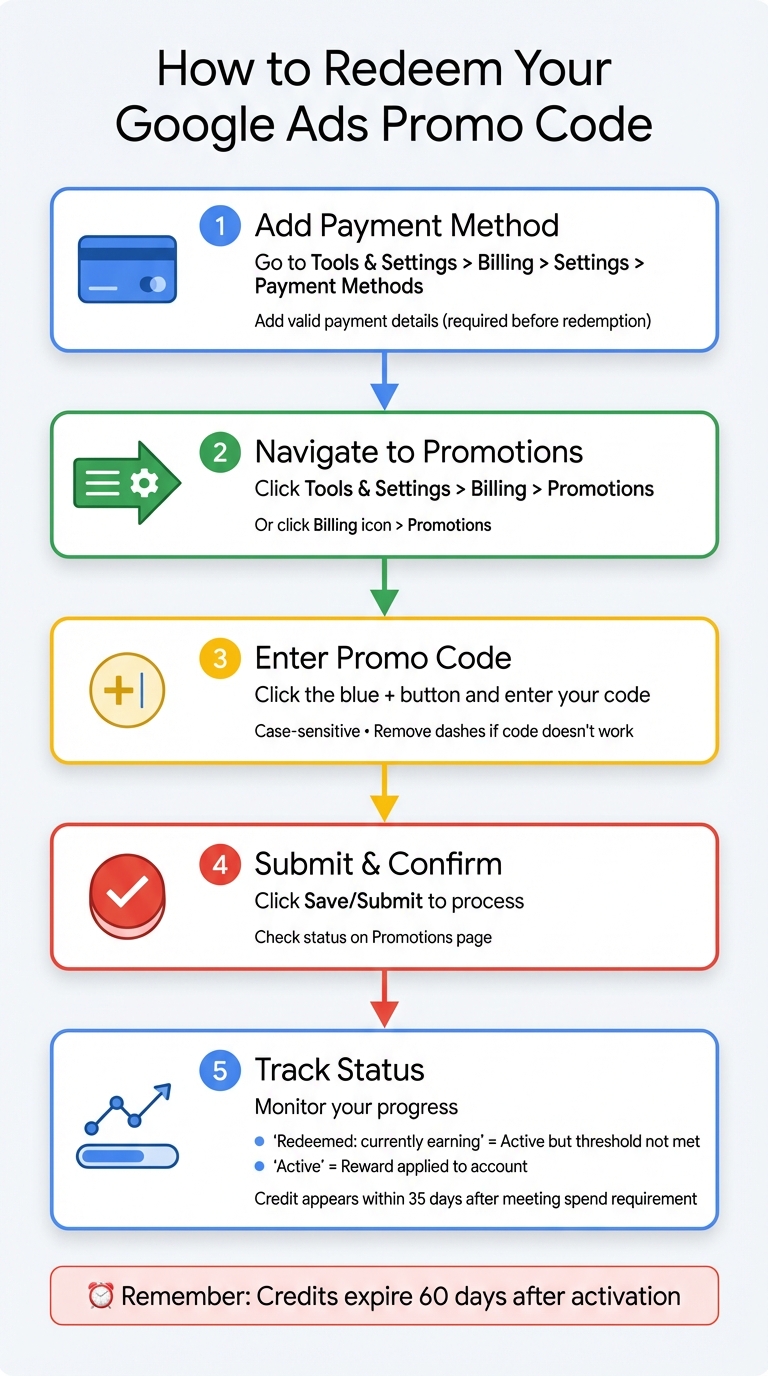
How to Redeem Google Ads Promo Codes: Step-by-Step Guide
Finding the Billing and Promotions Section
Before redeeming your promo code, make sure you’ve added a valid payment method. To set this up, go to Tools & Settings > Billing > Settings > Payment Methods in your Google Ads account and provide your billing details. Without this step, you won’t be able to apply any promo codes.
Once your payment method is ready, log into your Google Ads account. Click the Tools & Settings icon (the wrench), and under the Billing column, select Promotions. In some versions of the interface, you might see a Billing icon directly in the navigation bar. If that’s the case, click it and then choose Promotions from the menu. With your billing information in place, you’re ready to move on to entering your promo code.
Entering Your Promo Code
On the Promotions page, look for the blue plus (+) button and click it. This will open a text box where you can type or paste your promo code. Keep in mind that promo codes are case-sensitive. If your code isn’t working, try removing any dashes. Once you’ve entered the code, click Save or Submit to process it. The system will handle the code immediately.
Confirming Your Promo Code Was Applied
After submitting your promo code, check the Promotions page for updates. If the status says "Redeemed: currently earning," it means the code is active, but you still need to meet the required spending threshold. Once you’ve met that requirement, the status will change to "Active," indicating the reward has been applied to your account. Keep in mind that the Promotions page refreshes every few hours, so you can track your progress there.
For accounts using automatic or manual payments, the promotional credit will show up under the Active promotions section in your Billing Summary. If you’re on monthly invoicing, you’ll need to check the Transactions page instead. After meeting the spending requirement, it may take up to 35 days for the credit to appear in your account. Once the credit is ready, you can start using it to boost your best campaigns.
How to Get the Most from Your Promo Credits
Apply Credits to Your Best Campaigns
Focus your promo credits on campaigns that already deliver strong results. Prioritize remarketing campaigns targeting visitors who’ve interacted with your site or campaigns promoting your top-selling, high-margin products. Use tools like custom labels to identify your best performers and ensure every dollar of your credit drives the most value for your business.
Timing plays a crucial role. Use your credits during peak shopping periods like Black Friday, New Year’s sales, or major product launches to maximize their impact. To avoid overspending, calculate an end date for your credit by dividing your total funds (promo credit plus required spend) by your daily budget.
Fine-tune your campaigns by using exact match keywords, creating a robust negative keyword list, and optimizing your landing pages. Make sure your pages load in under three seconds and include clear calls-to-action. These adjustments can significantly enhance your results - businesses using Google Ads often see a 200% ROI, and adding live chat can further boost conversions by 20%.
For expert advice on setting up these strategies, keep reading to see how Surfside PPC can help you optimize your campaigns.
Work with Surfside PPC for Better Results
Avoid common mistakes by seeking professional help. Surfside PPC provides strategy and audit sessions starting at $299.00 to help you identify high-intent keywords and steer clear of broad match terms that can quickly drain your budget. Their team can also set up accurate conversion tracking, organize campaigns by theme, and ensure your Google Ads tag or GA4 tracking properly attributes leads or sales to your promo credit.
If you need ongoing support, Surfside PPC offers monthly management services for $500. These services are designed to optimize your campaigns continuously, ensuring you don’t waste your credits on low-performing traffic. Their experts can also help you disable settings like "Auto-Apply" and "Display Expansion", which often lead to poor results for advertisers with smaller budgets. Plus, they’ll ensure you meet the minimum spend requirement within the first 60 days so you can activate and fully use your credit before it expires.
Once you’ve set up your campaigns with professional help, it’s essential to stay on top of your results. The next section covers how to monitor performance and make necessary adjustments.
Track Performance and Make Adjustments
Keep tabs on your campaigns through the Promotions page under Billing, which updates every few hours to reflect your progress. Once your credit becomes active, check your Billing Summary regularly to track your remaining balance.
Review your campaign performance weekly. Adjust bids and creatives as needed. For remarketing campaigns, use frequency capping to avoid ad fatigue and ensure your ads stay effective. Additionally, implement a burn pixel on confirmation pages to automatically remove converted users from your remarketing lists. This approach helps reserve your credits for new potential customers.
Analyze which campaigns deliver the best returns during your promo period and use those insights to refine your future advertising efforts funded by your regular budget.
Wrapping It Up
The steps we’ve covered show how to make the most of Google Ads promo codes. Remember, once your promotional credit runs out, your ads will keep running unless you set an end date to manage your budget effectively.
Keep an eye on your progress through the Promotions page in the Billing section. To avoid surprises when your credit is used up, you might want to calculate your campaign’s end date using this formula: (Initial Spend + Credit Amount) / Daily Budget.
Redeem your promo code, plan wisely, and review your campaigns regularly. With a thoughtful approach, these credits can help you stretch your ad budget and drive meaningful results for your business.
FAQs
Why was my Google Ads promo code rejected?
Your Google Ads promo code might not be working for a few reasons. It could be invalid, expired, or typed incorrectly (remember, promo codes are case-sensitive). Another possibility is that your account or campaign type doesn’t qualify for the promotion. Make sure to double-check the code and confirm it meets all the necessary requirements before trying to apply it.
When will the promo credit show up after I meet the spend?
The promo credit typically shows up after you've met the required spending threshold and successfully redeemed the offer. However, the timing isn’t always immediate - it can take anywhere from a few hours to a few days. If you notice a delay, double-check that you’ve followed all the terms of the promo code and completed the redemption process correctly.
Will I be charged after the promo credit runs out?
Yes, once the promotional credit runs out, you'll be responsible for covering any additional ad costs. If you want to avoid extra charges, you can pause your ads whenever you like. For more information, check the terms and conditions.