

Google Ads Keyword Match Types Explained
Welcome back to Surfside PPC. Today, I am going to be going over Google Ads keyword match types. Basically, we're going to cover exactly how to build your keyword lists and what you really need to know about how Google actually matches your keywords to user search queries.
So, keyword match types in Google Ads determine how closely a user's search query needs to match your keyword for your ad to trigger. There are three main types that I'll go over: Broad Match, Phrase Match, and Exact Match. Each one gives you a completely different level of control over your ad spend:
- Broad Match: Maximizes your reach by showing ads for related searches, even if your exact keyword isn’t in the search. It's great for discovering new opportunities, but truthfully, it requires careful monitoring and a massive negative keyword list so you don't waste money on completely irrelevant clicks.
- Phrase Match: Provides a really good balance between reach and control. It targets searches that include the core meaning of your keyword, but people can have words before or after it.
- Exact Match: Offers the absolute tightest targeting. Your ads only show for searches that have the exact same intent as your keyword. This is best if you have a tight budget and want incredibly high-intent traffic.
Then, you have Negative Keywords. These are so important because they filter out junk traffic and block bad searches, ensuring you aren't wasting your budget. Using the right mix of match types and negative keywords is basically how you optimize your overall ad performance and get your CPA down.
Keyword Match Types: Quick Comparison
| Match Type | Syntax | Reach | Precision | Best For |
|---|---|---|---|---|
| Broad Match | keyword |
High | Low | Discovery and scaling brand awareness |
| Phrase Match | "keyword" |
Medium | Medium | Consistent lead generation |
| Exact Match | [keyword] |
Low | High | High-intent sales and conversions |
When you are creating your account and starting out, I always say use Phrase Match or Exact Match to guarantee quality traffic. Once you have enough conversion data flowing into your account, you can incorporate Broad Match with Smart Bidding to scale up. And always, always regularly review your Search Terms Report. I do this constantly to promote good queries and exclude the bad ones.
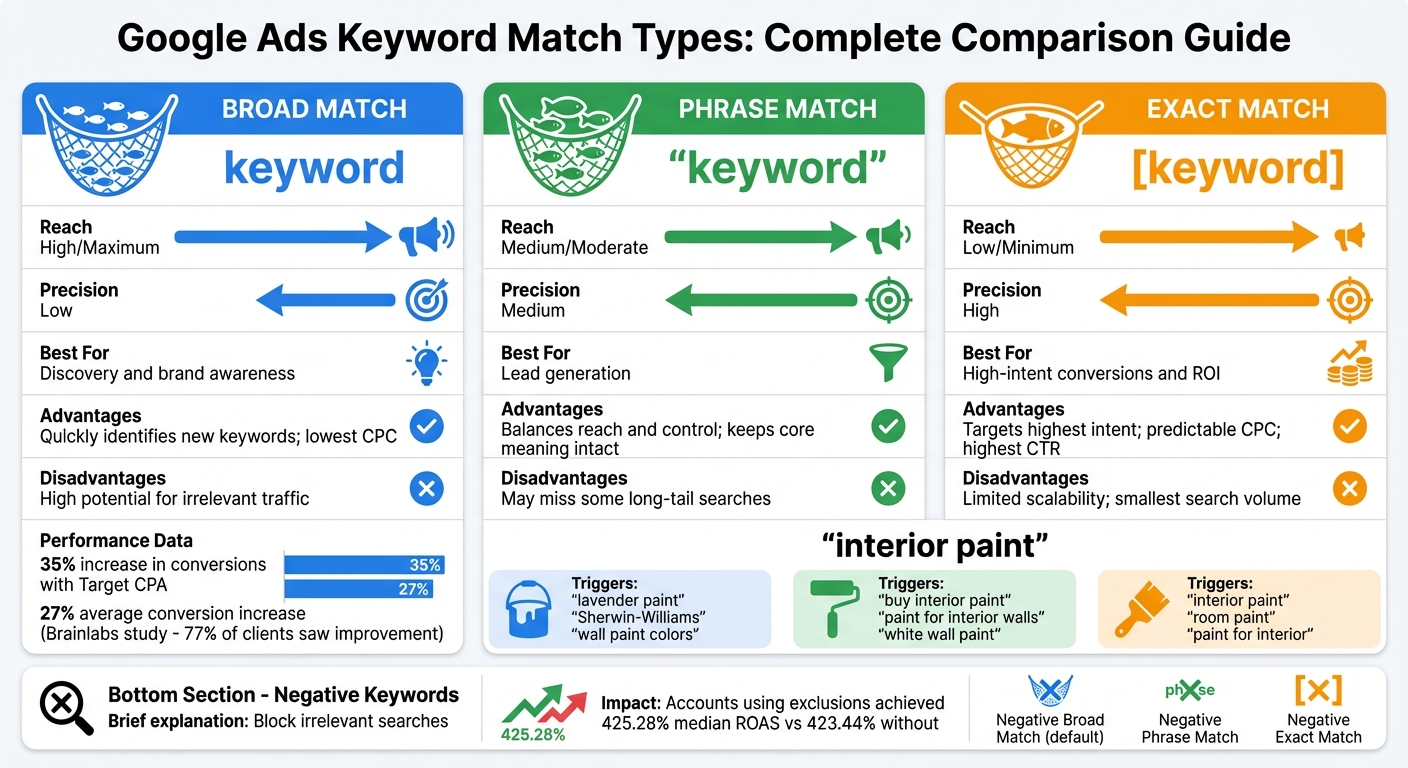
Google Ads Keyword Match Types Comparison Chart
Google Ads Match Types Explained For Beginners
sbb-itb-d8a1e45
The 3 Primary Google Ads Match Types Explained
So basically, to refine who actually sees your ads, Google gives you these three main options. Let's break down exactly how each one works.
Broad Match Keywords
Broad match is going to be your default setting when you add new keywords. It's designed by Google to maximize your overall reach. Your ads can appear for searches related to the meaning of your keyword. So, if your keyword is interior paint, your ad could show up for "lavender paint", "Sherwin-Williams", or "wall paint colors."
This match type relies heavily on Google's AI. A keyword isn't really just a strict string of text anymore; it’s more of a directional signal for Google's algorithm to go out and find customers.
Broad match works best when you pair it with Smart Bidding strategies like Target CPA or Target ROAS. I've seen plenty of accounts get a massive increase in conversions doing this. But, you have to be really careful. Without automated bidding, you're probably going to waste your ad spend. Make sure you maintain a massive negative keyword list to filter out stuff like "jobs" or "DIY". If you're a beginner, I usually don't recommend starting here.
Phrase Match Keywords
Phrase match strikes a really nice balance. It matches searches that include the exact meaning of your keyword, but people can put words before or after it. For example, "interior paint" could trigger ads for "buy interior paint" or "white interior wall paint."
This is ideal for capturing strong user intent while still giving Google a little bit of flexibility to find new search terms for you. I use this heavily for my lead generation campaigns because it keeps the traffic highly relevant without choking off volume completely.
Exact Match Keywords
Exact match is your narrowest, tightest targeting. Your ads only appear for searches that match the exact meaning or intent of your keyword. It used to be literal exact matches, but now Google includes "close variations" like misspellings or plurals. So, [interior paint] might trigger "room paint", but it definitely won't trigger broader stuff like "wall paint colors."
This is your laser target. You get less overall traffic, but it's typically the absolute highest-intent traffic you can possibly buy. If you have a tight budget, this is exactly where you want to live.
Negative Keywords: Stop Wasting Your Ad Spend
Match types help you connect with the right people, but negative keywords are your shield against bad traffic. They block queries you just don't want to pay for. If you sell premium products, you absolutely want to add "free" or "cheap" as negative keywords so you don't pay for bargain hunters clicking your ads.
What Are Negative Keywords?
Basically, these prevent specific searches from triggering your ads. Unlike regular keywords, they do NOT automatically include close variants. If you want to block "bike" and "bikes", you actually have to add both of those exact words to your negative list.
You can apply them at the account, campaign, or ad group level. You also have three match types for negatives:
- Negative Broad Match: Blocks ads if the search contains all your negative terms in any order.
- Negative Phrase Match: Excludes searches containing the exact terms in the same exact order.
- Negative Exact Match: Blocks only searches that exactly match your phrase with absolutely no extra words before or after.
How to Find and Add Negative Keywords
The most important tip I can give to you is to check your Search Terms Report. Look for search queries that cost you money but aren't actually relevant. Here's exactly how you do it:
- Go into your Search Terms report and identify the irrelevant terms.
- Select them and add them directly as negative keywords.
- For account-wide control, go to "Negative search keywords", create a list, and apply it to your campaigns.
I always create Shared Library lists for common junk terms. It saves so much time. Accounts using exclusions consistently see a much higher ROAS.
Google Ads Match Type Comparison Table
Here is a quick breakdown to help you choose the right match type for whatever campaign you're trying to build.
Match Type Advantages & Disadvantages
| Match Type | Syntax | Reach | Precision | Primary Use Case | Advantages | Disadvantages |
|---|---|---|---|---|---|---|
| Broad Match | keyword | Maximum | Low | Brand awareness and discovery | Quickly identifies new keywords; lowest CPC | High potential for irrelevant traffic |
| Phrase Match | "keyword" | Moderate | Medium | Lead generation | Balances reach and control; keeps core meaning intact | May miss some long-tail searches |
| Exact Match | [keyword] | Minimum | High | Sales conversions and ROI | Targets highest intent; predictable CPC; highest CTR | Limited scalability; smallest search volume |
The Best Strategy for Using Match Types
Adding Keywords with Different Match Types
Adding keywords is easy once you know the punctuation. You literally just type them into the keywords field like this:
- Plain text for broad match (e.g., running shoes)
- Double quotes for phrase match (e.g., "running shoes")
- Square brackets for exact match (e.g., [running shoes])
If you need to do a bunch of them at once, Google Ads Editor is what I usually use. It makes it a lot easier to manage everything in bulk.
Combining Match Types for Better Performance
You really want to blend these. A common strategy I use is exact match for my absolute best, high-intent keywords, phrase match for consistent traffic, and then a little bit of broad match to explore new search terms.
Again, I will always tell you to check your Search Terms Report. When you find a really good search term popping up from a broad match keyword, promote it to exact match and bid higher on it. Take the bad ones and make them negatives immediately.
Final Verdict on Keyword Match Types
So, choosing your match types is really about balancing your budget and your data. Exact match gives you complete control. Phrase match gives you a really nice middle ground. Broad match opens up new doors, but truthfully, only use it once you have Smart Bidding and conversion tracking set up properly.
Start cautiously. I usually start with phrase and exact. Then, as the account gets more data, I'll test broad match to scale up. It keeps your budget safe while letting you grow the account.
FAQs
How do I choose the right match type for my budget?
So, to pick the best match type, you really have to think about how much control you want over your ad spend. Broad match casts a massive net, which brings in more clicks but can waste money on irrelevant stuff. Phrase match and Exact match are way more specific and help you avoid unnecessary spending. Honestly, if you have a smaller budget, I always recommend starting with phrase or exact match and making sure you use a solid list of negative keywords.
When should I switch from phrase/exact to broad match?
Switching to broad match makes perfect sense when you have a good amount of conversion data and you want to scale up your reach. Start with phrase match or exact match to get your account running profitably. Once you've optimized your negative keywords and Google's AI knows exactly what a conversion looks like for your business, then you can confidently test broad match paired with Smart Bidding.
How often should I update my negative keywords?
Truthfully, there isn't a strict schedule, but I usually check my Search Terms Report and update my negative keywords at least once a week for active campaigns. If it's a smaller, dormant account, maybe once a month. It is the absolute best way to cut down on wasted ad spend and keep your traffic highly relevant.
Related Blog Posts
- Google Ads Keyword Planner
- Exact Match Keywords: Impact on Ad Performance
- How to Use Search Terms Report for Negative Keywords
- Google Ads Course
0 comments