

Google Ads Certification is a free program offered through Google Skillshop that verifies your expertise in managing Google Ads campaigns. It’s a valuable credential for marketers, freelancers, and agencies aiming to improve their skills and credibility. Each certification requires passing a 49-50 question exam with a score of at least 80% (70% for Apps). Exams are timed at 75 minutes and can be retaken after 24 hours if failed. Certifications are valid for one year and must be renewed annually.
Key Highlights:
- Who It’s For: Marketers, freelancers, agencies, and anyone managing PPC campaigns.
- Benefits: Boosts professional credibility, helps meet Google Partner requirements, and keeps you updated on advanced Google Ads features.
- Available Certifications: Search, Display, Video, Shopping Ads, Apps, and more.
- Preparation: Free courses on Google Skillshop, hands-on practice, and structured study plans.
- Exam Details: 80% pass rate, 75-minute duration, and reattempt after 24 hours if needed.
Whether you’re looking to advance your career, attract more clients, or meet agency requirements, this certification equips you with the latest tools and strategies to run successful campaigns.
Google Ads Certification: How To Pass The Exam
sbb-itb-d8a1e45
Why Get Google Ads Certified
Earning a Google Ads certification shows that you’ve mastered the platform’s features and proven your ability to run successful campaigns. Unlike generic marketing credentials, this certification comes directly from Google, giving it an extra layer of credibility. Whether you’re freelancing, working for an agency, or climbing the ladder in your current role, this certification can help you stand out, build trust, and sharpen your skills.
Build Professional Trust
Being Google Ads certified means you’ve earned official recognition from Google as a knowledgeable expert. After passing the exam, you’ll receive a personalized certificate that you can showcase on your resume, LinkedIn profile, or even your business cards. This credential tells potential clients and employers that you’ve met Google’s standards and are ready to manage campaigns with confidence.
For freelancers, certification helps establish credibility, while for agencies, it’s even more critical. To achieve a Google Partner or Premier Partner badge, at least 50% of account strategists must hold up-to-date certifications. These badges not only attract clients looking for verified expertise but also demonstrate a commitment to quality. In fact, many employers now require Google Ads certification as part of the hiring process or onboarding.
Run Better Campaigns
The certification process equips you with practical skills to improve campaign performance. You’ll learn how to conduct effective keyword research, set bidding strategies, and use tools like Performance Planner to optimize display campaigns. It also covers measurement and analytics, teaching you how to integrate Google Ads with Google Analytics and turn data into actionable insights.
You’ll dive into AI-powered features that automate and fine-tune campaigns. For video campaigns, the training focuses on YouTube audience targeting and creative storytelling strategies. If you’re in e-commerce, the Shopping Ads certification offers tips on promoting inventory and boosting conversions through Smart Shopping campaigns. These skills not only enhance your campaigns but also make you a stronger, more capable professional.
Advance Your Career
Having a Google Ads certification makes it easier for employers to see your expertise at a glance. It shows that you’ve not only studied the platform but also know how to apply your knowledge to real campaigns.
For agency professionals, your certification adds value to your company by helping it maintain its Partner status. This, in turn, can lead to more opportunities for you, whether it’s a promotion, new responsibilities, or greater recognition within your team.
Types of Google Ads Certifications
Google Skillshop provides certifications tailored to specific campaign types, helping marketers and advertisers refine their expertise. Five of these certifications - Search, Display, Video, Shopping ads, and Apps - are essential for achieving Google Partner or Premier Partner status. Each certification remains valid for one year, requiring an annual retake to maintain your credentials. Here's a breakdown of the certifications, their focus areas, and how they can benefit your advertising skills.
Google organizes its certifications into two levels. Foundational certifications focus on strategic and conceptual knowledge, making them ideal for strategists. On the other hand, Professional certifications (currently limited) are designed for practitioners, emphasizing hands-on skills for campaign implementation and management. Professional certifications include virtual proctoring to ensure exam integrity, while foundational ones do not. This structure allows you to choose a certification that aligns with your role - whether you're shaping strategies or executing campaigns.
Each certification strengthens your expertise in pay-per-click (PPC) management and validates your ability to excel across various ad formats.
Google Ads Search Certification
This certification dives into the essentials of creating and managing Search campaigns. It covers keyword strategies, bidding techniques, and the use of AI-powered tools to improve campaign performance. Search advertising is particularly effective for reaching customers actively searching for products or services, making it a key tool for intent-driven marketing.
Google Ads Display Certification
The Display certification focuses on running visually engaging campaigns through the Google Display Network. You'll learn about automated bidding strategies, building brand awareness using Google Display Audiences, and leveraging the Performance Planner to expand your reach. This certification is especially valuable for brand managers aiming to capture attention with visual media while driving measurable results.
Google Ads Video Certification
This certification centers on YouTube and Google's video advertising solutions. It covers video ad formats, audience targeting, and storytelling strategies to create compelling campaigns. Whether you're looking to engage audiences or share your brand's story, this certification equips you with the tools to maximize the impact of video ads.
Additional Certifications
Beyond the core certifications, Google offers others to further enhance your skills:
- Google Ads Measurement Certification: Focuses on setting up Google Ads and Google Analytics to track meaningful metrics and turn data into actionable insights.
- Google Ads Apps Certification: Validates your ability to create and optimize App campaigns to meet business performance goals. This is also one of the five certifications required for Partner status.
- AI-Powered Shopping Ads Certification: Formerly known as Shopping Ads, this certification teaches you how to connect products with shoppers and drive conversions through Smart Shopping campaigns.
- AI-Powered Performance Ads Certification: Covers automation features and AI-powered functionalities to help you manage campaigns more effectively.
- Google Ads Creative Certification: Focuses on creative best practices to improve ad performance using high-quality assets.
To earn any of these certifications, you'll need to score at least 80% on the assessment, which you must complete within 75 minutes. If you don't pass, you can retake the exam after a 24-hour waiting period.
How to Get Certified
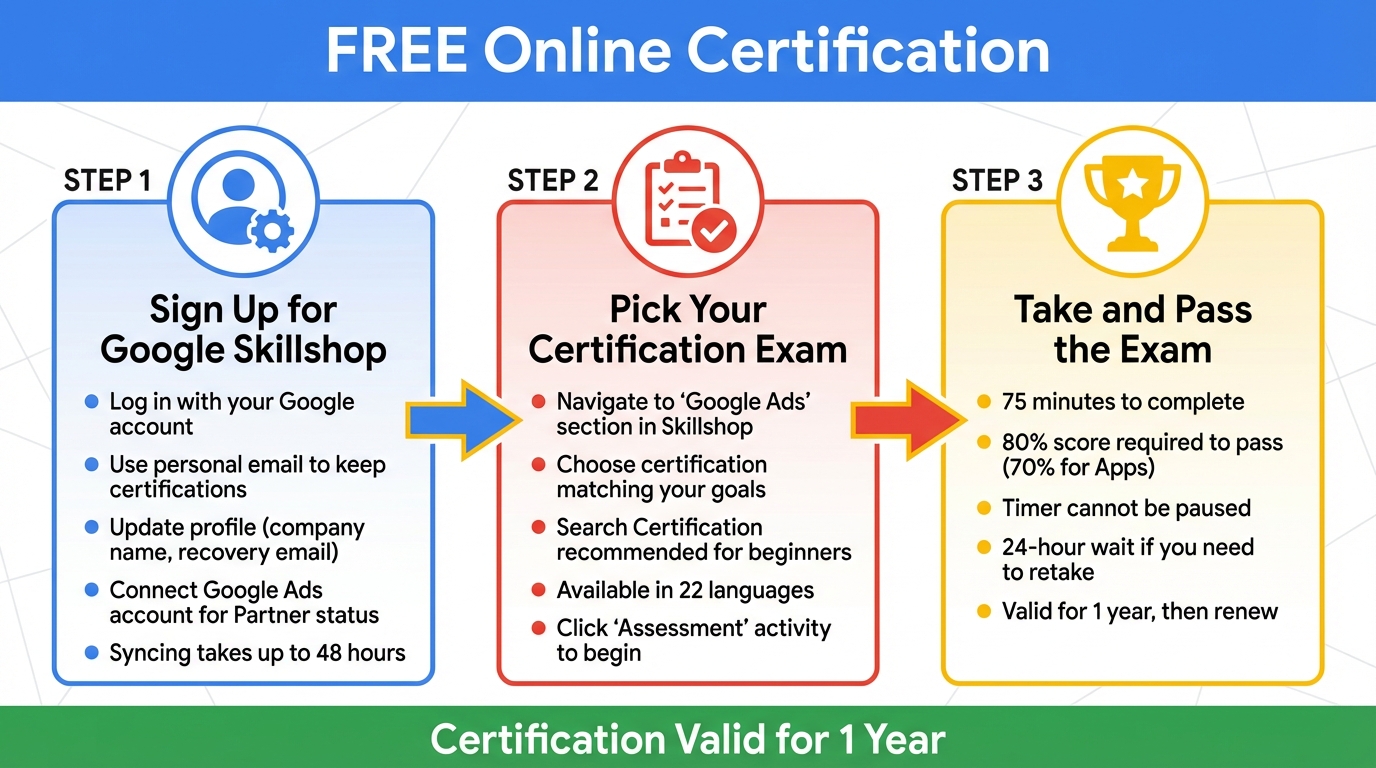
Google Ads Certification Process: 3 Steps to Get Certified
You can earn your Google Ads certification for free through Google Skillshop. The entire process is online, and you can move at your own pace. Here's how you can create an account and earn your certification.
Sign Up for Google Skillshop
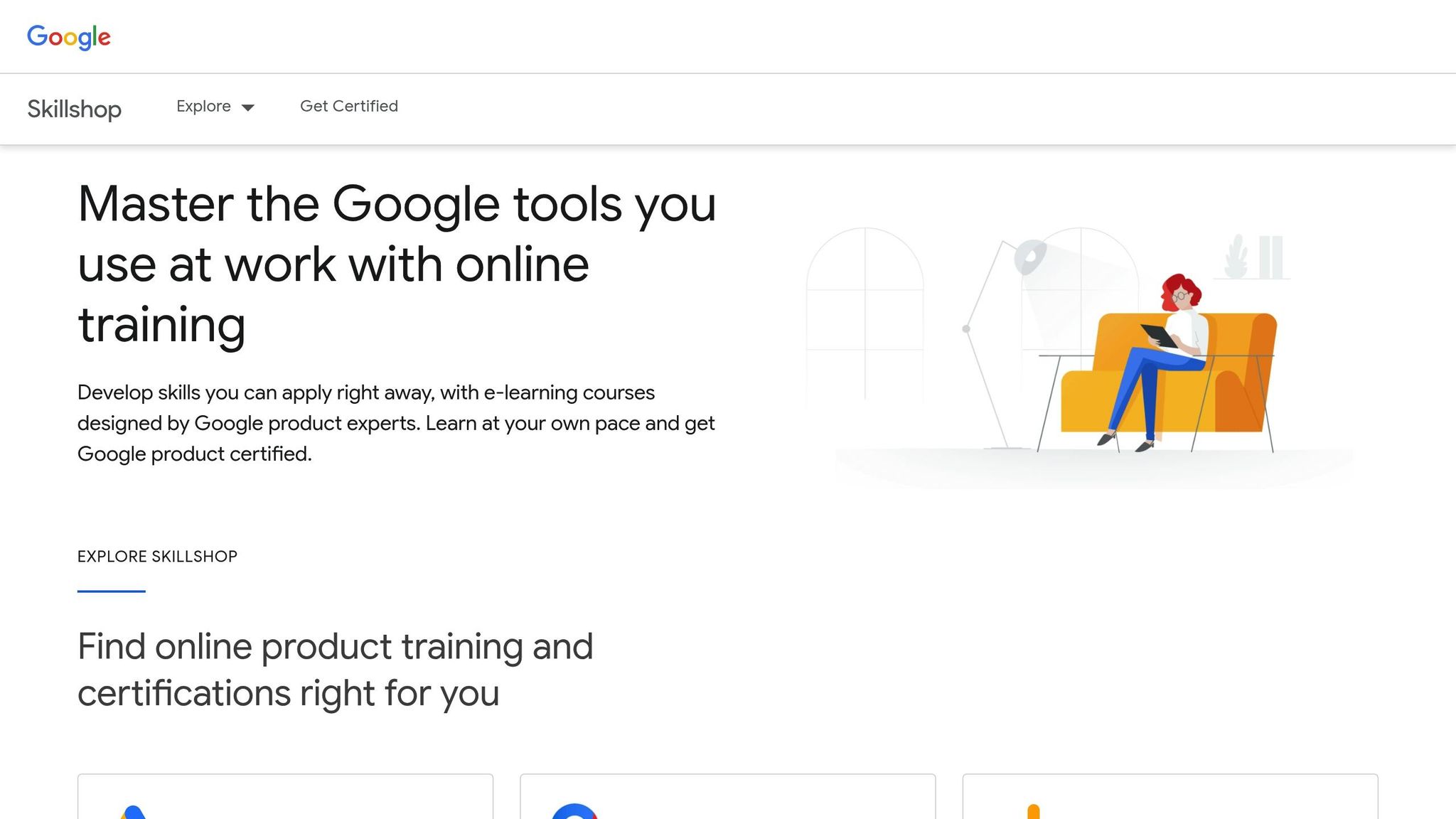
Head over to Google Skillshop and log in using your Google account. It’s a good idea to use a personal email address so your certifications stay with you, even if you change jobs. Once logged in, update your profile with details like your company name and a recovery email.
If you want your certification to count toward your company's Google Partner status, link your Skillshop profile to your Google Ads account. To do this, click the "Connect Your Google Ads Account" button in your profile settings and agree to the Data Sharing Agreement. Keep in mind that syncing your Skillshop profile with your Google Ads account can take up to 48 hours.
After setting up your profile, you’ll need to select the certification exam that matches your expertise.
Pick Your Certification Exam
Navigate to the "Google Ads" section in Skillshop to explore the available certifications. Choose the one that best fits your goals and the types of campaigns you work on. If you’re new to Google Ads, the Google Ads Search Certification is a great place to start since search campaigns are a core part of many PPC strategies. If your focus is on visual or video advertising, you might prefer the Display or Video certifications. To begin, click the "Assessment" activity for the certification you want.
Exams are also available in 22 languages, so you can take the test in the language you’re most comfortable with.
Take and Pass the Exam
Once your account is ready and you’ve chosen your exam, you can start the assessment. Each exam takes 75 minutes, and you’ll need a score of 80% to pass (70% for Apps). Note that the timer starts when you begin and can’t be paused. If your browser closes or your internet connection drops, you’ll have to wait 24 hours to retake the test.
Before starting, make sure your computer is plugged in and your internet connection is stable. While most people finish early, take your time to carefully read each question. Once you pass, your certification remains valid for one year. After that, you’ll need to retake the assessment to maintain your certification.
How to Prepare for the Exam
Getting ready for your Google Ads certification exam takes more than just skimming through study guides. A solid plan that blends structured learning, consistent practice, and hands-on experience with Google Ads is key.
Study with Google Skillshop
Google Skillshop provides free, interactive courses tailored to help you ace the exam. These courses combine marketing strategies with practical product knowledge and include real-world case studies to keep things relevant. Each module is bite-sized, taking only 10 to 15 minutes, and you can track your progress on the "My Activities" page.
To get the most out of these courses, make sure to complete all activities and practice questions in your chosen learning path. These exercises are designed to pinpoint areas where you might need more work and help you gauge how prepared you are. Once you’ve gone through the material, stick to a structured study schedule to stay on track.
Set Up a Study Schedule
Most certification paths take about 3 to 4 hours to complete. Breaking this into smaller, manageable study sessions can make the process less overwhelming. Focus on the key topics that frequently appear on exams, such as campaign types, bidding strategies, ad formats, and performance metrics.
Since most exams require a score of 80% or higher to pass (70% for the Apps exam), it’s worth spending extra time on topics you’re less confident in. Use downtime to revisit weak areas, and stick to your study schedule. But don’t just stop at studying - practical application is just as important.
Practice with Real Campaigns
While reading and studying are helpful, hands-on practice is where the real learning happens. Set up a demo account or use an existing Google Ads account to experiment with building campaigns. You can practice setting up campaigns without actually launching live ads.
This hands-on experience helps you familiarize yourself with the Google Ads interface, making it easier to navigate during the exam. When faced with questions about workflows or optimization techniques, you’ll feel more confident because you’ve already performed those tasks yourself.
Use Your Certification with Surfside PPC
Now that you’ve earned your certification, it’s time to put it to work. Surfside PPC offers tools and guidance to help you turn your knowledge into real campaign results.
While certification proves your understanding of Google Ads, achieving success in actual campaigns often requires advanced strategies and expert insights. Surfside PPC provides specialized training, consulting, and management services to help you bridge that gap and see measurable improvements in your campaigns.
Surfside PPC Google Ads Course
The Google Ads Course 2026 ($34.99) builds on your certification by teaching you the latest optimization strategies tailored for 2026 campaigns. While certification covers the basics, this course dives into up-to-date techniques that give you a competitive edge.
Expert Consulting and Management Services
Once you’ve passed your exam, consider investing in a Strategy & Audit Session ($299.00). This session evaluates your campaigns, identifies weak spots, and aligns your account with the best practices for 2026.
Prefer a hands-off approach? Opt for Google Ads Management Services ($400.00), where Surfside PPC handles the daily optimization and scaling of your campaigns. Founder Corey Frankosky works directly with clients, offering personalized expertise to drive results. For example, in 2025, Surfside PPC partnered with Precision Tree Services to create a multi-channel strategy. The result? A 52% reduction in lead costs and a 40% increase in jobs by the end of the year. These services ensure your campaigns are continuously refined for better performance.
Keep Improving Your Campaigns
To stay ahead, it’s crucial to adapt to platform changes and analyze performance data. The Surfside PPC Premium membership ($5.00/month) gives you exclusive access to a community, bonus podcasts, and ongoing training resources. Additionally, free resources like the "Google Ads 1-2-3-4-5 Training" offer continuous education on the five core areas of campaign success in 2026.
Businesses that consistently optimize their Google Ads campaigns have seen an average year-over-year conversion rate increase of 6.84%, proving the value of staying proactive.
Conclusion
This guide has walked you through everything - from signing up to mastering advanced strategies with your Google Ads Certification. Earning this credential not only confirms your expertise with the platform but also boosts your professional reputation. As a no-cost, globally acknowledged certification, it helps you stand out to potential employers, strengthens client confidence, and even opens the door for your agency to qualify for Google Partner status.
Once you pass the exam, you'll gain access to powerful tools like Performance Planner and AI-driven optimization features. Businesses leveraging Google Ads often see tangible benefits, including an average year-over-year conversion rate increase of 6.84%. Show off your achievement by adding the digital badge to your LinkedIn profile or resume to catch the attention of employers.
FAQs
Which Google Ads certification should I take first?
The Google Ads Search certification is a great first step for anyone looking to understand the basics of Google Ads. It's often seen as one of the most important certifications for beginners. Beyond that, certifications in Search, Display, and Video are highly recommended. These are excellent for developing a well-rounded PPC skill set, especially for those just starting with Google Ads.
What happens if my exam session disconnects or my browser closes?
If your exam session gets disconnected or your browser unexpectedly closes, don't worry - you can rejoin and pick up where you left off. However, if the system flags inactivity or encounters technical problems, you might need to restart the exam. If you run into trouble, reach out to support for help resolving the issue.
How do I link my Skillshop certificate to Google Partner status?
To associate your Skillshop certificate with Google Partner status, you need to link your Skillshop account to your Google Ads account. Make sure both accounts use the same email address. This ensures your certifications will count toward meeting your company's Partner requirements. You can confirm the connection through your Skillshop or Google Partners dashboard. Also, double-check that your certifications are active and properly displayed to help your company qualify for the Partner badge.
0 comments