

Google Ads campaigns for SaaS businesses routinely waste 20–40% of their total ad budgets on completely irrelevant clicks. This massive budget bleed is lethal because enterprise SaaS sales cycles average 84 days and involve complex B2B decision-makers. Misaligned bidding goals, poor exact-match keyword targeting, and broken CRM tracking severely inflate your Customer Acquisition Cost (CAC).
Executing a strict account audit requires fixing these core elements:
- Set Strict KPIs: You must calculate your exact Cost Per SQL (Sales Qualified Lead) and LTV:CAC ratio to define profitability.
- Fix CRM Tracking: You must configure Offline Conversion Tracking (OCT) to explicitly connect your Google Ads spend to closed-won revenue.
- Audit Search Terms: You must aggressively build negative keyword lists to kill irrelevant traffic and force exact match types.
- Restructure Campaigns: You must isolate your ad groups strictly by funnel stage (ToFu vs. BoFu) and user intent.
- Refine Ad Copy: You must write benefit-driven headlines with clear CTAs to capture high-intent enterprise buyers.
- Optimize Audiences: You must deploy custom intent segments and isolate your remarketing lists to prevent ad fatigue.
- Audit Landing Pages: You must ensure your mobile landing pages load in under 3 seconds and perfectly match the ad's specific messaging.
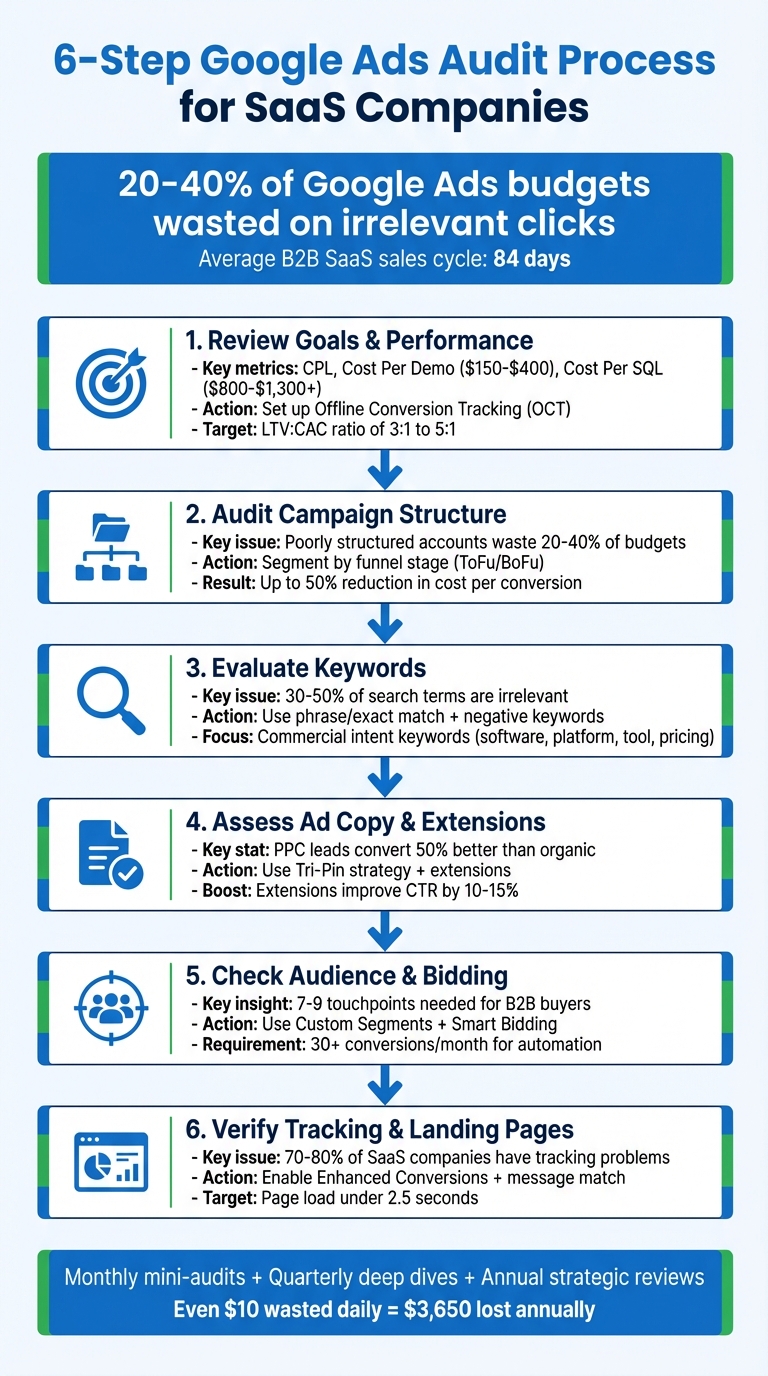
6-Step Google Ads Audit Process for SaaS Companies
Live SaaS Google Ads Audit: Fix Wasted Spend & Boost Conversions
sbb-itb-d8a1e45
Step 1: Audit SaaS Account Goals and Performance Data
Measuring the true success of your SaaS campaigns requires focusing strictly on revenue-driven actions like booked demo requests, verified corporate email trial signups, and Sales Qualified Lead (SQL) submissions. Optimizing your bids for cheap, generic website clicks will destroy your ROAS.
Defining Strict Key Performance Indicators (KPIs)
Your KPIs must map to your entire B2B sales funnel. Tracking your Cost Per Lead (CPL), Cost Per Demo Request, and Cost Per SQL is mandatory. The 2026 average Cost Per Qualified Lead for enterprise SaaS sits strictly between $800 and $1,300, while a standard demo request costs $150 to $400. Generating numbers wildly outside these benchmarks proves your account structure is broken.
Deploying Offline Conversion Tracking (OCT) is the single most important technical fix. Connecting your CRM data (like Salesforce or HubSpot) directly back to Google Ads trains the Smart Bidding algorithm to optimize for actual closed deals, not just empty form fills. Originality.AI utilized Aimers in 2025 to implement OCT, shifting their optimization from free trials to paid conversions, which instantly spiked their Google Ads revenue by 100%.
Calculating your LTV:CAC ratio (Lifetime Value to Customer Acquisition Cost) determines your scaling capacity. You must maintain a strict minimum ratio of 3:1, though elite SaaS companies operate near 5:1. Because B2B sales cycles average 84 days, you must configure micro-conversions (like verified email pings or completed onboarding steps) to feed Google's algorithm fresh data while you wait for the final deal to close.
Analyzing Historical Google Ads Data
Auditing your historical campaign data requires isolating at least three months of metrics to accurately identify bidding trends. Compare your data against 2026 B2B SaaS benchmarks: non-branded CPCs average $5.34, median conversion rates hover at 1.54%, and standard Cost Per Conversion sits at $50.26.
A steadily declining CTR definitively signals ad creative fatigue, while a spiking CPC without a matched increase in conversions proves your Quality Scores are failing. A risk management SaaS firm partnered with WebZodiac to pivot their generic broad-match strategy toward high-intent exact-match keywords, generating a massive 60% spike in Sales Accepted Leads (SALs).
Executing a weekly audit of your Search Terms Report is mandatory to kill irrelevant clicks before they drain your budget. Finally, you must calculate your Return on Ad Spend (ROAS) based strictly on total customer lifetime value (LTV). While initial first-purchase ROAS for SaaS averages 3.5×, factoring in total LTV frequently pushes that number to 8–15×.
Step 2: Restructure Campaigns and Ad Groups
Your Google Ads account structure physically dictates how efficiently you control budgets and scale winning keywords. A chaotic, poorly structured account guarantees you will waste 20–40% of your ad budget on cross-pollinated, irrelevant traffic.
Enforcing Strict Campaign Naming Conventions
Deploying standardized naming conventions is required for quick data analysis. Naming a campaign "Search | US | CRM-Trial" immediately tells you the network, geography, and objective, whereas "Campaign 1" is completely useless. Maxim Baeten from aubado states:
"Campaign 1 tells you nothing. 'Search | US | Brand Keywords' tells you everything".
You must rigorously segment your SaaS campaigns by funnel stage. Mixing intent levels destroys your CPA targeting:
- Bottom-of-Funnel (BoFu) campaigns must isolate high-intent keywords like "best CRM software" and drive traffic directly to a hard demo booking page.
- Top-of-Funnel (ToFu) campaigns must target informational queries like "how to manage leads" and drive traffic strictly to gated whitepapers or educational content.
This strict segmentation prevents budget bleeding. However, building more than 20 campaigns in a mid-sized account severely dilutes the conversion data Google's algorithm needs to function. Adalystic restructured a B2B SaaS account in January 2025 by ruthlessly deleting overlapping campaigns, resulting directly in a 50% drop in cost per conversion while doubling total volume.
Auditing your location targeting settings is a mandatory check. You must select "Presence: People in or regularly in your targeted locations" rather than the default "Presence or interest." Maxim Baeten warns:
"The most expensive setting mistake is location targeting set to 'Presence or interest.' An account targeting the UK could be serving ads to users in the US, India, or anywhere else searching about the UK".
Leaving this default setting active easily wastes 10–30% of your daily budget on international click fraud.
Enforcing Single-Intent Ad Groups (SKAGs)
Every ad group must contain a single, hyper-specific focus, such as "Enterprise CRM features" or "CRM for small business." You must strictly limit ad groups to 5–15 identical-intent keywords to guarantee high ad relevance and maximize your Quality Scores. Stuffing 30+ loosely related keywords into one ad group mathematically destroys your CTR and inflates your CPC.
When ad groups are tightly structured, your headlines perfectly match the user's exact search intent. This relevance boosts your CTR by up to 30%. You must audit your account to ensure your primary keywords maintain a Quality Score of 6 or higher.
Categorizing your SaaS keywords by intent type is highly effective:
- Category: "HR Software"
- Feature: "Automated leave tracking software"
- Competitor: "Asana enterprise alternatives"
- Integration: "CRM that integrates natively with Slack"
- Brand: Your exact company name and product variations
| Structure Level | SaaS Organization Strategy | Goal |
|---|---|---|
| Campaign | By Product Line or Funnel Stage (ToFu/BoFu) | Strict budget control and CPA alignment |
| Ad Group | By Specific Feature or Use Case | Maximum ad relevance and Quality Score |
| Keywords | 5–15 keywords with identical intent | Precise targeting and CTR optimization |
Step 3: Audit Keyword Targeting and Negative Lists
Selecting the correct match types and deploying massive negative keyword lists is the only way to stop wasting 20–40% of your budget on bad traffic.
Auditing Keyword Match Types
Google has fundamentally altered how match types function. "Exact match" no longer means exact text; it now triggers for variations sharing the same perceived intent. Broad match relies entirely on Google's AI to guess relevance. Alon T from NegWords explains:
"Exact match now means 'Google thinks this search has the same intent as your keyword'".
You must start your core SaaS campaigns using strict phrase match and exact match targeting. If you choose to deploy broad match, you must legally pair it with Smart Bidding (Target CPA or Target ROAS) to prevent the algorithm from buying garbage clicks.
You must strictly isolate commercial intent keywords containing modifiers like "software," "platform," "tool," or "pricing." PipeRocket Digital audited a $10M B2B SaaS account in 2025 and aggressively segmented their campaigns by this exact intent criteria, instantly slashing ad spend by 27% while spiking revenue by 59%.
Aggressively Expanding Negative Keywords
Failing to deploy negative keywords guarantees that 30–50% of your search terms will be completely irrelevant. Michael Schroder states:
"Negative keywords refine ad targeting, cut wasteful spending, and boost campaign performance".
You must audit your Search Terms Report daily for new campaigns and weekly for mature accounts to spot bleeding queries.
SaaS companies must immediately deploy shared negative keyword lists blocking terms like: "free," "open source," "jobs," "internship," "login," "support," "cheap," and "crack." These terms attract job seekers and existing customers who will never generate net-new revenue.
- Deploy broad match negatives to nuke general terms like "jobs" or "free."
- Deploy phrase match negatives to block specific strings like "free trial without credit card."
You must immediately add "login" as an exact match negative keyword. Bidding on your own users trying to log into their existing accounts is a massive waste of capital. Rob Andolina from Keywordme states:
"A campaign-level negative is a scalpel for a specific problem. A shared negative keyword list is a shield for universal threats".
Step 4: Audit Ad Copy and Asset Extensions
Your ad copy dictates your CTR, and high-intent PPC leads inherently convert 50% better than organic leads because you control the exact messaging.
Writing Benefit-Driven Ad Headlines
You must rewrite your headlines to focus entirely on business outcomes rather than boring technical features. Replacing "Lead scoring tool" with "Accelerate your B2B sales pipeline" speaks directly to the executive decision-maker. Kamel Ben Yacoub from Getuplead notes:
"99% of poor Google Ads performance is mainly because they all use the same messages and copies as their competitors".
You must inject commercial intent keywords like "software" or "demo" directly into your Headline 1. You must also end every ad with a definitive Call-To-Action (CTA) like "Start Free Trial" or "Book a Demo."
Deploying the "Tri-Pin" strategy inside your Responsive Search Ads guarantees structural control:
- Pin five explicit keyword-rich headlines in Position 1.
- Pin five aggressive benefit-focused headlines in Position 2.
- Pin five strong CTA headlines in Position 3.
Maximizing Ad Asset (Extension) Usage
Deploying all available ad assets physically expands your ad size on the SERP, actively pushing your competitors down the page. Utilizing sitelinks and callouts routinely improves CTR by 10–15%.
You must activate these specific assets for SaaS campaigns:
- Sitelinks: Deep link to "Pricing Plans," "Enterprise Case Studies," and "Book a Demo."
- Callout extensions: Highlight major USPs like "SOC2 Compliant," "No Setup Fees," or "24/7 Support."
- Structured snippets: List specific technical capabilities like "Cloud Storage, API Access, Single Sign-On."
Deploying lead form extensions allows enterprise buyers to request a demo directly from the search results without ever visiting your website, massively reducing friction.
Step 5: Audit Audience Segmentation and Bidding
Aligning your bidding strategy with highly segmented audiences guarantees you don't overpay for low-quality clicks. Anastasiya Khvin from Aimers states:
"Google Ads isn't a discovery tool; it's an amplification tool".
Deploying Custom Audience Segments
You must audit and apply these exact Google Ads audience layers:
- In-Market Audiences: Users flagged by Google as actively researching enterprise software.
- Custom Segments: Users who explicitly visited competitor URLs (e.g., asana.com) or searched specific competitor terms.
- Your Data Segments: High-value remarketing lists built from your GA4 data.
Deploying Custom Segments based strictly on competitor URLs is highly lucrative for SaaS. You must layer these segments over your search campaigns and apply positive bid adjustments.
You must aggressively segment your remarketing lists. Exclude users who already converted to save budget, and build specific Display Network campaigns to retarget users stuck in the "Free Trial" phase to force them to upgrade to a paid tier.
Evaluating Smart Bidding Strategies
Your bidding strategy must mathematically align with your exact conversion volume:
- Manual CPC: Mandatory for brand new campaigns generating fewer than 30 conversions per month.
- Target CPA: The standard for stable campaigns generating 30–100 conversions monthly.
- Target ROAS (Value-Based Bidding): The ultimate goal for campaigns generating 100+ conversions with attached CRM revenue data.
Connecting your CRM via Offline Conversion Tracking and migrating to Value-Based Bidding (Target ROAS) routinely delivers a 14% boost in actual conversion value while actively lowering your CPL by 31%.
Step 6: Audit Conversion Tracking and Landing Pages
Broken conversion tracking forces Google's AI to bid blindly, wasting up to 40% of your budget. If your landing pages fail to match your ad copy perfectly, you will hemorrhage expensive clicks.
Verifying Conversion Tracking Accuracy
You must establish a strict conversion hierarchy. High-value actions like "Demo Booked" must be set as Primary conversions for bidding, while "Newsletter Signup" must be relegated to Secondary (Observation only) status.
You must configure your counting method correctly in Google Ads. Lead-generation conversions must be set to "One" instead of "Every" to prevent a user refreshing the "Thank You" page from artificially inflating your conversion data.
You must utilize Google Tag Assistant to explicitly verify that your tracking snippet fires exactly once upon form submission. Enabling Enhanced Conversions is mandatory to bypass cookie restrictions by passing hashed first-party user data securely back to Google.
Optimizing Landing Page Performance
Your landing page must execute flawless message match. If your ad promotes "enterprise project management software," your H1 tag must state "Enterprise Project Management Software." Removing top navigation menus and external links is mandatory to trap the user and force the conversion.
You must replace generic stock photos with actual software dashboard screenshots. Because 81% of B2B software buyers heavily weigh security, you must prominently display SOC 2 Type II badges and live uptime data above the fold.
Utilizing Google PageSpeed Insights to pass your Core Web Vitals test is critical. Your landing page must achieve a Largest Contentful Paint (LCP) strictly under 2.5 seconds. A slow mobile landing page will instantly kill your Quality Score and bounce expensive clicks.
Common SaaS Google Ads Pitfalls Checklist
Failing to address these recurring issues will destroy your B2B SaaS campaigns. Because enterprise clicks are extremely expensive, wasting just $10 a day mathematically burns $3,650 annually.
Mixing distinct search intents into a single campaign is the most common error. You cannot combine branded keywords (your company name) with non-branded competitors and accurately measure your CPA. You must isolate these intents into separate campaigns.
Tracking the wrong conversions destroys the algorithm. Aaron Rovner from SaaS Hero advises:
"Pick ONE primary conversion action that's closest to revenue and stick with it. This gives Google a clear optimization target".
Skipping CRM integration forces you to optimize for junk lead volume rather than closed-won revenue.
Common Pitfalls and Fixes
| Pitfall | Impact on SaaS ROI | Quick Fix |
|---|---|---|
| Combining Diverse Search Intents | Skewed CPA data; algorithmic confusion. | Split campaigns strictly into Branded, Non-Branded, and Competitor. |
| Informational Keyword Focus | Massive overspending on "how-to" researchers. | Isolate keywords containing commercial intent like "platform" or "pricing". |
| Uniform Landing Pages | High bounce rates; low Quality Scores. | Build isolated landing pages perfectly matching the ad group intent. |
| Ignoring CRM Integration | Optimizing bids for junk leads instead of revenue. | Deploy Offline Conversion Tracking (OCT) to feed SQL data to Google. |
| Neglecting Negative Keywords | Wasting 20-40% of budget on terms like "free" or "cheap". | Deploy massive shared negative lists across all search campaigns. |
| Tracking Only Final Sales | Algorithm starves due to 84-day sales cycles. | Track micro-conversions (e.g., App Connection) as Primary goals. |
| Paying for Existing Customers | Bidding on your own users seeking support. | Add "Login" and "Support" as exact match negative keywords immediately. |
Conclusion: Key Takeaways for SaaS Google Ads Audits
Executing a Google Ads audit is an aggressive, ongoing process required to scale SaaS MRR. Accurate conversion tracking is the foundation; without connecting Google Ads to your CRM via OCT, your Smart Bidding algorithm is entirely blind. Shockingly, 70-80% of SaaS companies fail to configure this, forcing them to optimize for empty lead volume instead of closed-won deals.
You must ruthlessly focus your budget on high-intent Bottom-of-Funnel keywords. Bidding on awareness-level queries drains your budget before you can capture buyers ready to schedule a demo. Demio executed this exact audit framework in 2025, spiking their customer base by 110% while slashing acquisition costs by 24%.
You must implement a strict maintenance schedule. Execute monthly mini-audits to review the Search Terms report and add negative keywords. Execute quarterly deep dives to restructure ad groups and refresh failing ad copy.
If your internal team lacks the technical expertise to execute these fixes, Surfside PPC offers elite Google Ads consulting explicitly tailored for SaaS platforms. Booking a 90-minute strategy session immediately uncovers your most expensive account errors and provides a clear roadmap to profitability.
Frequently Asked Questions
What should I track as a primary conversion for SaaS?
Tracking primary conversions requires focusing strictly on high-value actions like booked demo requests, verified corporate email trial sign-ups, and submitted Sales Qualified Leads (SQLs). You must configure these exact actions as "Primary" in Google Ads to force the Smart Bidding algorithm to optimize your budget for revenue-generating milestones rather than empty website clicks.
When should I use broad match vs phrase or exact match?
Deploying broad match is only recommended when strictly paired with Smart Bidding (Target CPA or ROAS) to locate new high-intent queries that your exact lists missed.
Utilizing phrase match provides tight control while allowing for natural long-tail variations. You must deploy exact match for your absolute highest-converting core keywords to guarantee maximum ad relevance, secure top impression share, and aggressively lower your cost-per-click.
How do I connect Google Ads to closed-won revenue in my CRM?
Connecting Google Ads directly to closed-won CRM revenue requires executing Offline Conversion Tracking (OCT). You must perform these exact steps:
- Identify key CRM stages: Isolate exact milestones like "Demo Completed" or "Contract Signed."
- Implement GCLID tracking: You must capture the Google Click ID (GCLID) in a hidden field on your website forms.
- Connect your CRM via API: You must integrate Salesforce or HubSpot directly with Google Ads to push the GCLID data back when a deal closes.
- Optimize for Target ROAS: Once the offline data populates, you must switch your bidding strategy to Target ROAS to train the AI on actual revenue.
0 comments